SQL Server 可在地端、雲端、Fabric 等任何環境執行;無論身在何處,透過 Azure Arc 與 Azure 連線是最常見的整合方式。微軟把 Azure Arc-connected SQL Server 定義為「混合 SQL Server」(hybrid SQL Server)。
SQL Server 2025 大多數新功能不要求 Azure Arc。但下列功能除外:
- Fabric Mirroring(第 8 章)
- Microsoft Entra(本章)
即便沒有強制需求,Azure Arc 仍能提供諸多 value-added 服務。
Azure Arc 是什麼#
「Arc 是電弧,意思是『跨越間隙的放電』,恰如 Azure Arc 把不在 Azure 中的資源連到 Azure 雲。」
— Bob Ward
Azure Arc 是一系列混合能力的總稱,包含 servers、Kubernetes clusters、data services、SQL Server 等。Azure Arc 由兩大要素組成:
- Azure 上的 Resource Provider:管理 Azure 端的資源
- 軟體 Agent:執行於 VM、Kubernetes cluster 或實體伺服器中
對 SQL Server 來說,最關鍵的是 Azure Arc Connected Machine Agent——在 Windows 上以服務、在 Linux 上以 daemon 方式執行。Agent 主要負責:
- 把機器註冊為 Azure 資源(Azure Portal 上呈現為 Azure Arc Machine)
- 支援擴充元件(extensions)
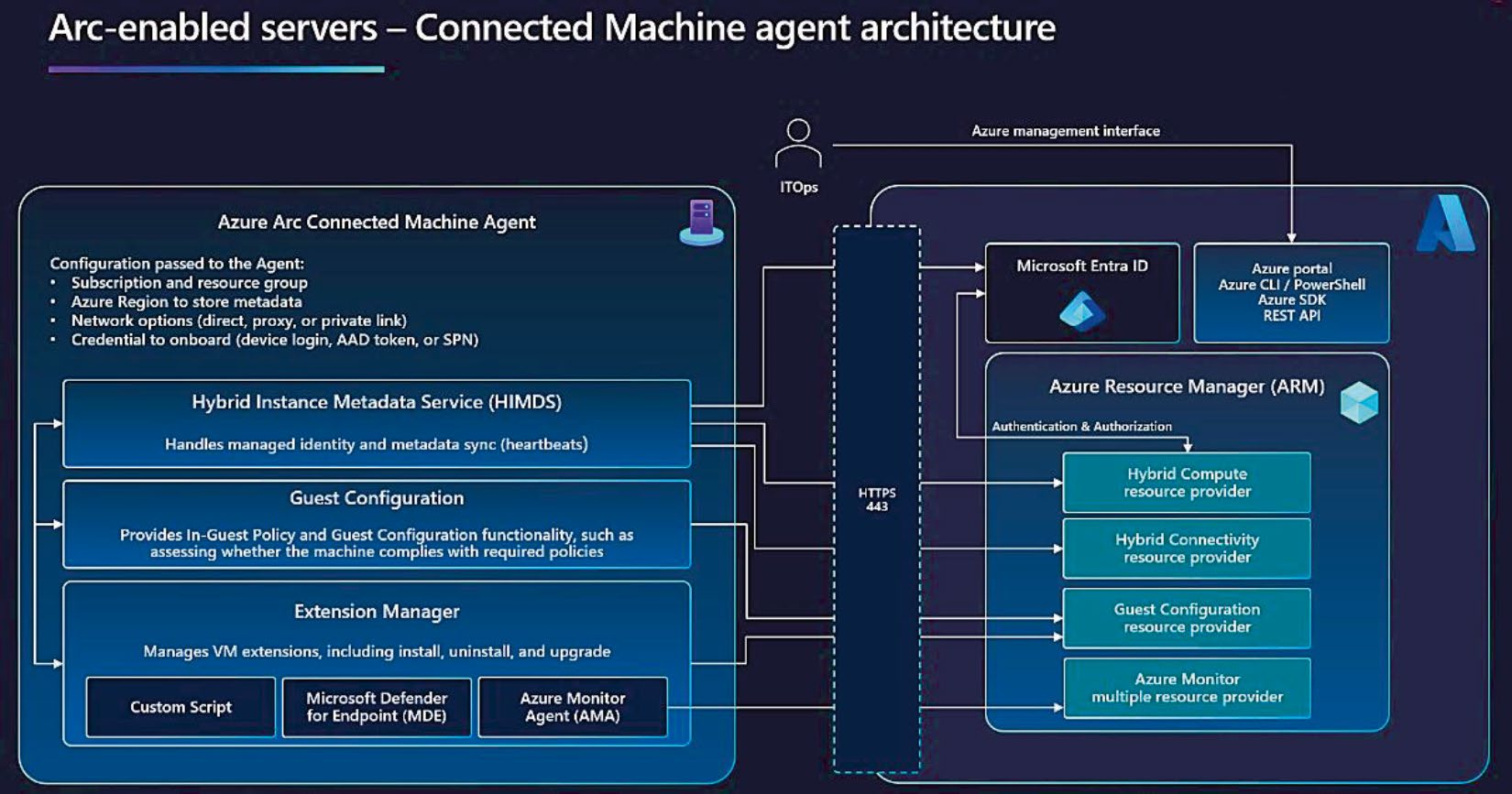
Figure 6-1: Azure Arc Connected Machine Agent
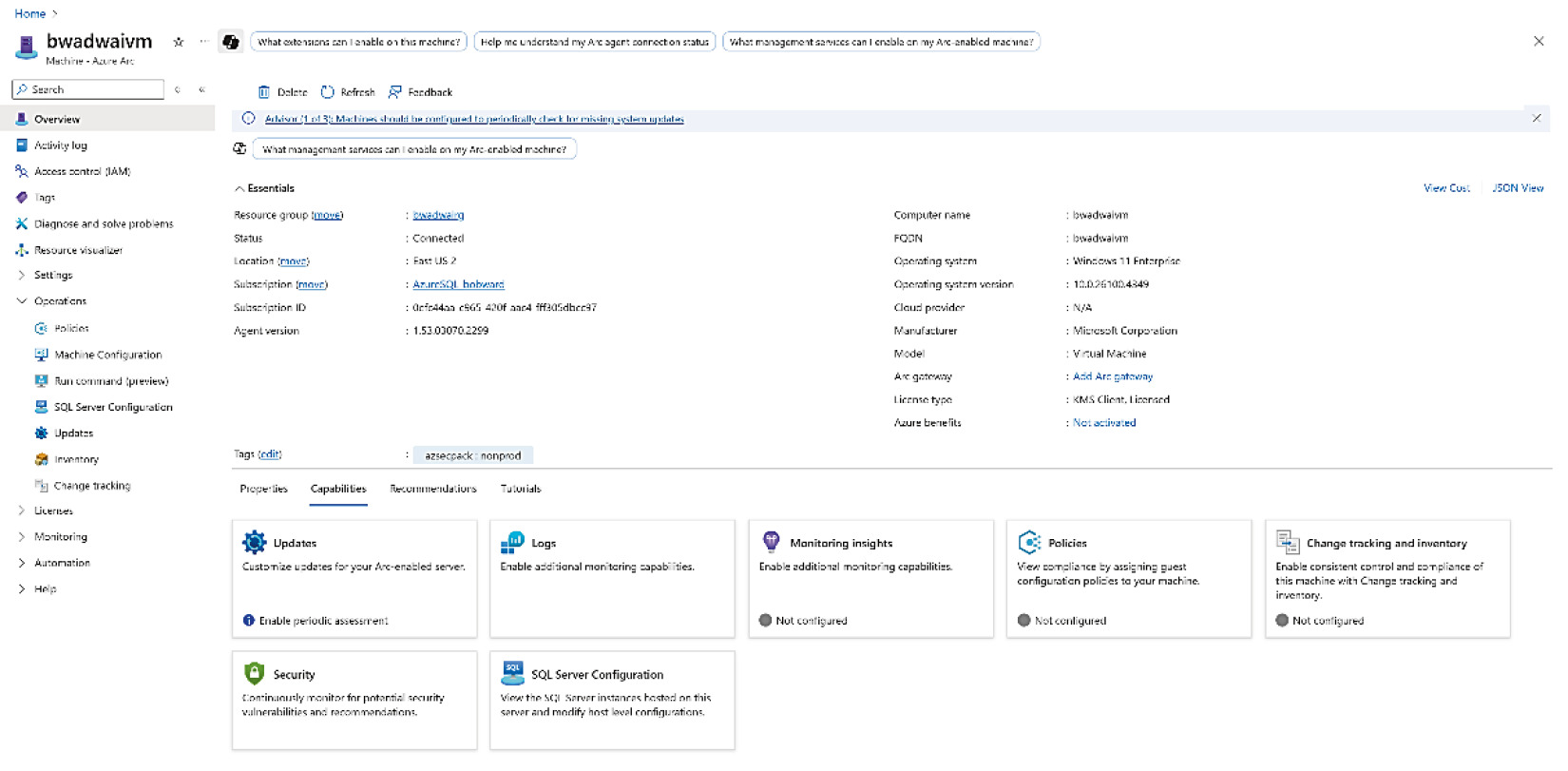
Figure 6-2: Azure Arc Machine 資源
Azure Arc Machine 不在 Azure 中執行,Azure 僅儲存 metadata。即使不裝 SQL Server,Arc 也能提供:
- 免費伺服器盤點(inventory)
- Azure Update Manager 自動化 OS 更新
- 作業系統效能監控
最常見的 Arc extension 之一是 Azure Monitor Agent(AMA),可彙整效能資料到 Log Analytics Workspace。SQL Server 的關鍵則是 Azure extension for SQL Server。
SQL Server enabled by Azure Arc#
SQL Server enabled by Azure Arc:把不在 Azure 中執行的 SQL Server(私有雲或其他公有雲)連到 Azure,獲得 value-added 服務。
Azure extension for SQL Server 透過 outbound 443 與 Azure 的 data plane 通訊;agent 可使用最低權限帳戶執行。
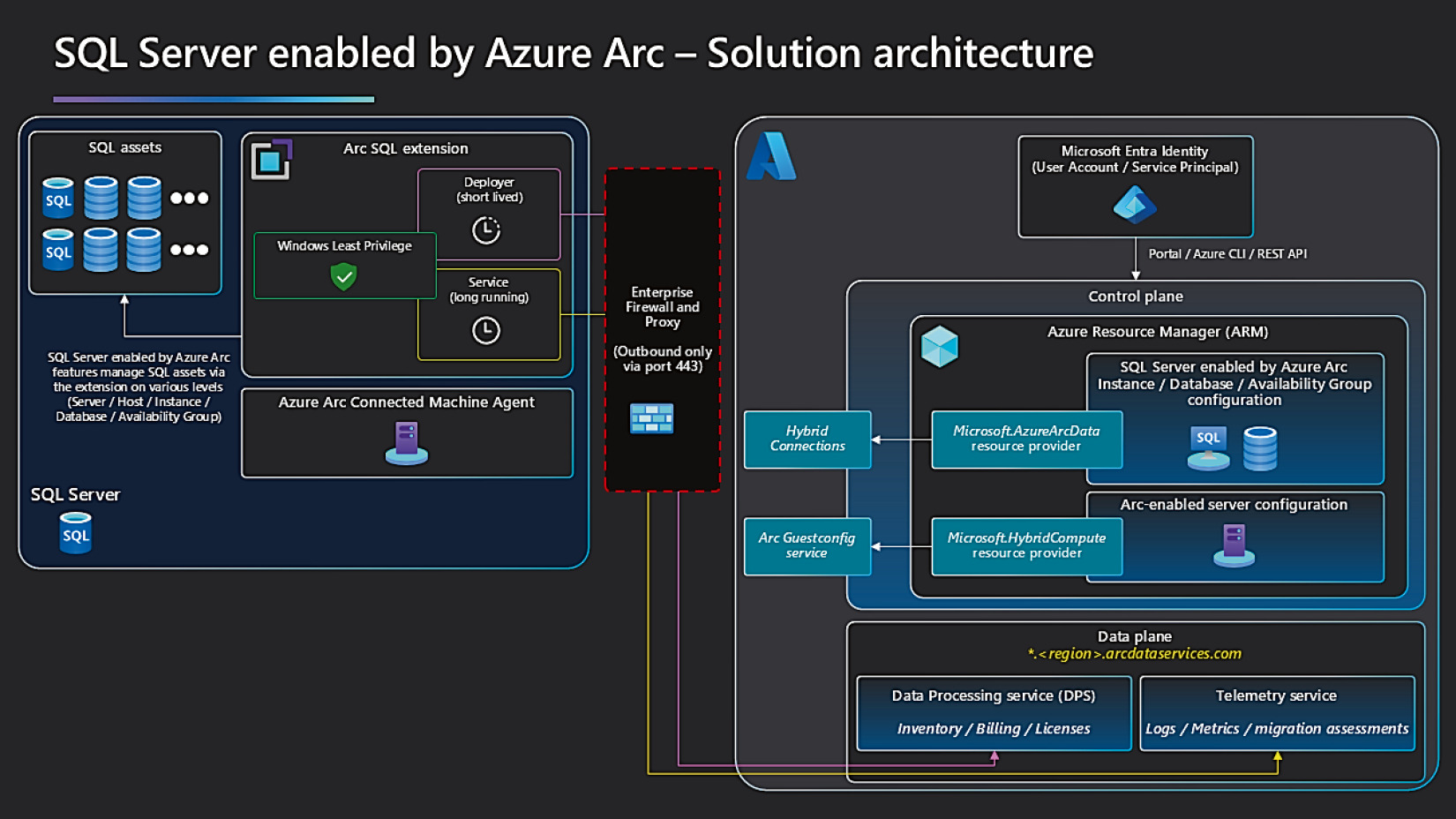
Figure 6-3: SQL Server enabled by Azure Arc 架構
提供的服務#
以下功能依授權方式與作業系統不同會有差異。Release notes:
https://learn.microsoft.com/sql/sql-server/azure-arc/release-notes
| 功能 | 重點 |
|---|---|
| Inventory | 集中盤點所有連線的 SQL Server 與資料庫;可用 Azure Resource Graph Explorer 跨 instance 查詢(免費) |
| License(PAYG) | 按 Azure 訂閱使用量付費(pay-as-you-go),按核心、按小時計費 |
| Extended Support Updates(ESU) | 為超出主流支援期的舊版 SQL Server 提供 ESU,可用 PAYG 支付 |
| Best Practices Assessment | 對照微軟最佳實踐評估設定 |
| Microsoft Entra ID Authentication | 取代地端認證,支援 Managed Identity |
| Azure Policy | 全域治理規則一致性 |
| Azure Monitor / Log Analytics | 效能、健康、log 集中分析 |
| Microsoft Defender for SQL | 進階威脅防護 |
| Automated Local Backups | 自動本地備份;支援 point-in-time restore |
| Automated Patching | 目前僅支援安全性更新 |
| Always On Management | 從 Portal 監看 FCI 與 Availability Groups,並可發起 failover |
透過 SQL Server 2025 Setup 部署 Azure Arc#
Arc 不能裝在 Azure VM(已有 IaaS Agent)。但可依
https://learn.microsoft.com/azure/azure-arc/servers/plan-evaluate-on-azure-virtual-machine模擬非 Azure 環境作為練習。
前置條件#
- Azure 訂閱
- 已建立 resource group
- Microsoft Entra 登入,具備:
- 訂閱 Read 權限
- resource group Contributor / Owner 等權限
- Azure 註冊兩個 resource provider:
Microsoft.AzureArcData、Microsoft.HybridCompute
安裝畫面欄位#
執行 SQL Server 2025 setup 時的關鍵欄位:
- Use Azure Login / Service Principal:通常用 Azure Login 即可
- Azure Tenant ID:Microsoft Entra Tenant
- Azure Subscription ID:可下拉切換
- Azure Resource Group:必須為既有
- Azure Region:通常與 resource group 同區
- Proxy Server URL:若有需要
若不要使用 Arc,可在這個畫面取消勾選 Azure extension for SQL。
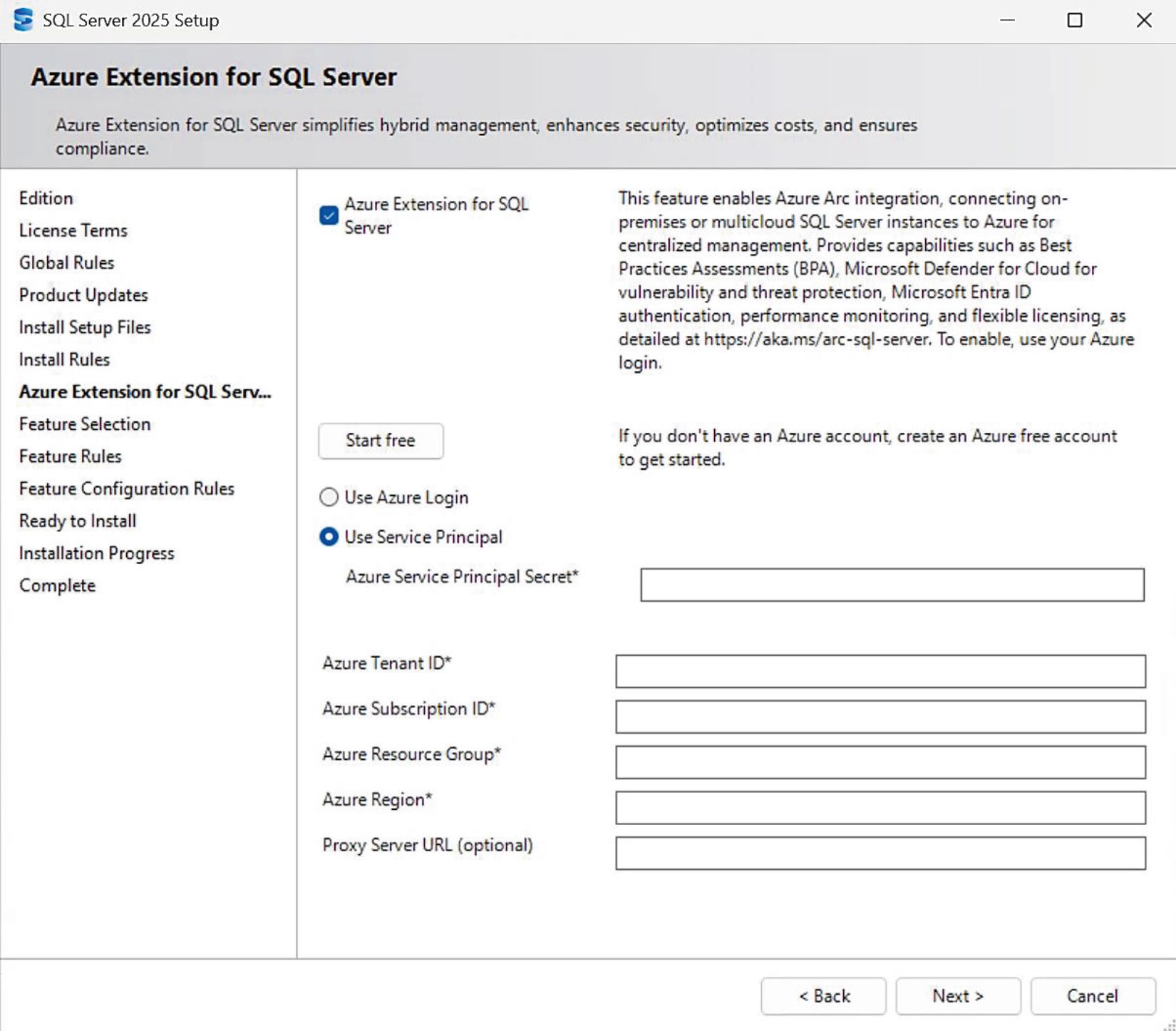
Figure 6-4: SQL Server 安裝中的 Azure extension 設定畫面
安裝後檢查#
Setup 完成後,Windows 程式列表會新增:
- Azure Connected Machine Agent
- Microsoft SQL Server Extension(即 Azure extension for SQL Server)
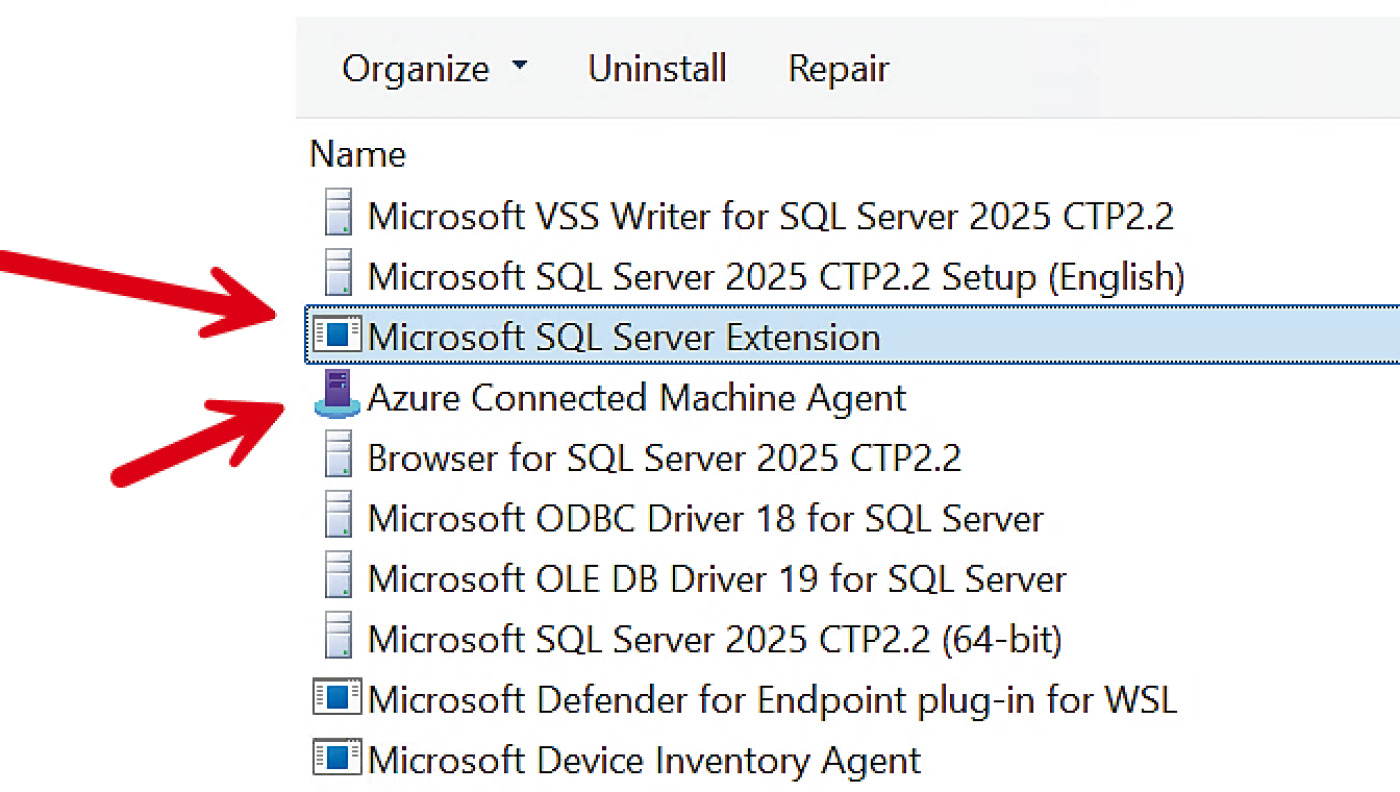
Figure 6-5: Windows 安裝完成的 Azure Arc 程式
對應的 Windows Services 為 Windows Azure Guest Agent 與 Microsoft SQL Server Extension Service。
Azure Portal 中對應的兩個資源:
- Machine - Azure Arc:VM 與 OS 相關
- SQL Server - Azure Arc:必須有對應的 Machine 資源才存在
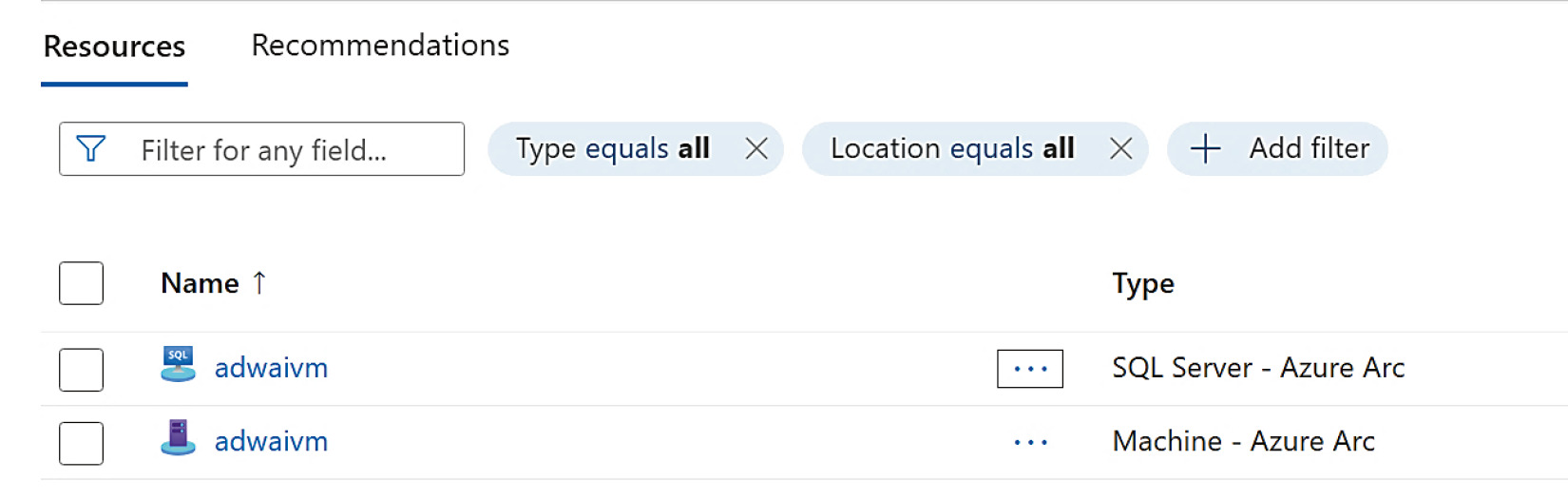
Figure 6-6: SQL Server 2025 安裝後的 Azure Arc 資源
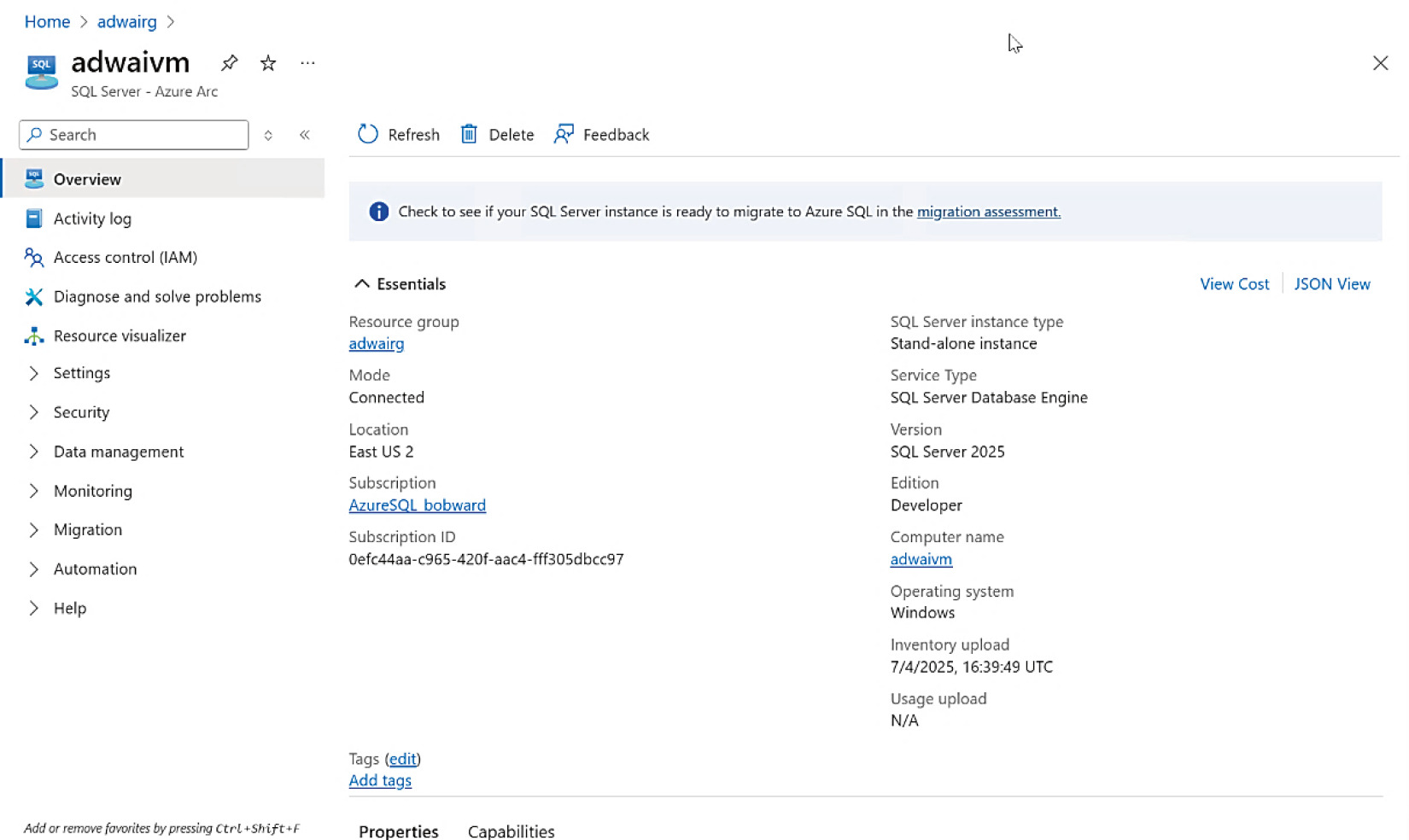
Figure 6-7: SQL Server – Azure Arc 概覽頁面
Setup 完成後,所有 Arc 資源在 Azure Portal 顯示可能需要數分鐘。
應用情境一:Inventory at Scale#
單一資料庫詳情#
在 SQL Server – Azure Arc 資源頁中,可以看到所有資料庫的清單與屬性(如 backup 狀態),這層 inventory 是免費的。
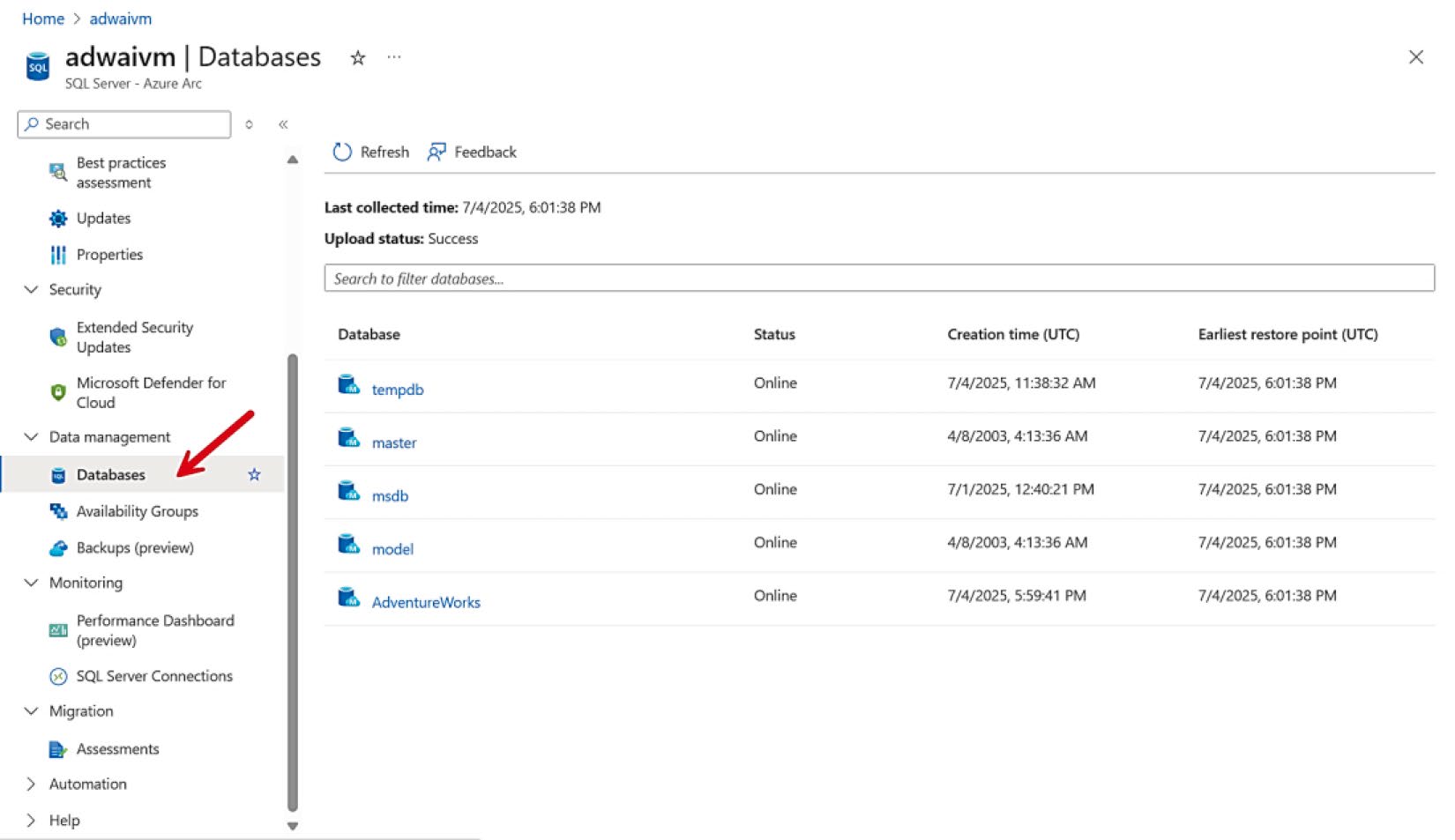
Figure 6-8: SQL Server enabled by Azure Arc 的資料庫盤點
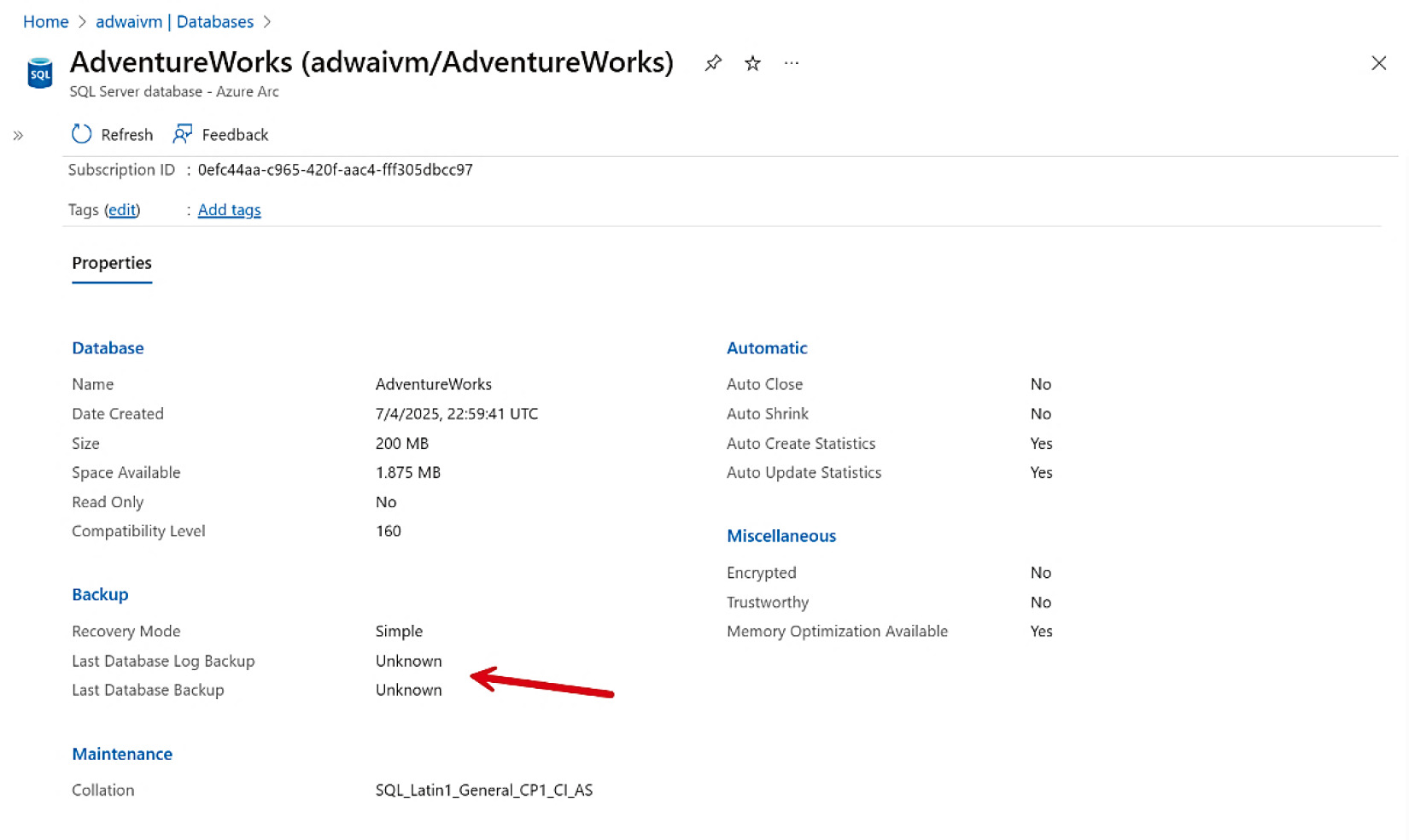
Figure 6-9: SQL Server Azure Arc 資料庫詳情
跨 instance 查詢#
真正強大的是 Azure Resource Graph 跨所有 Arc-enabled SQL Server 的查詢,搭配 Azure Copilot 自動產生查詢範例:
- 「我有多少個 SQL Server 2014 instance?」
- 「哪些 instance 跑在 Linux?」
- 「跨所有 SQL Server 的 dbcompat 分布直方圖」
Copilot 產生 KQL 查詢後即可在 Charts 視覺化。
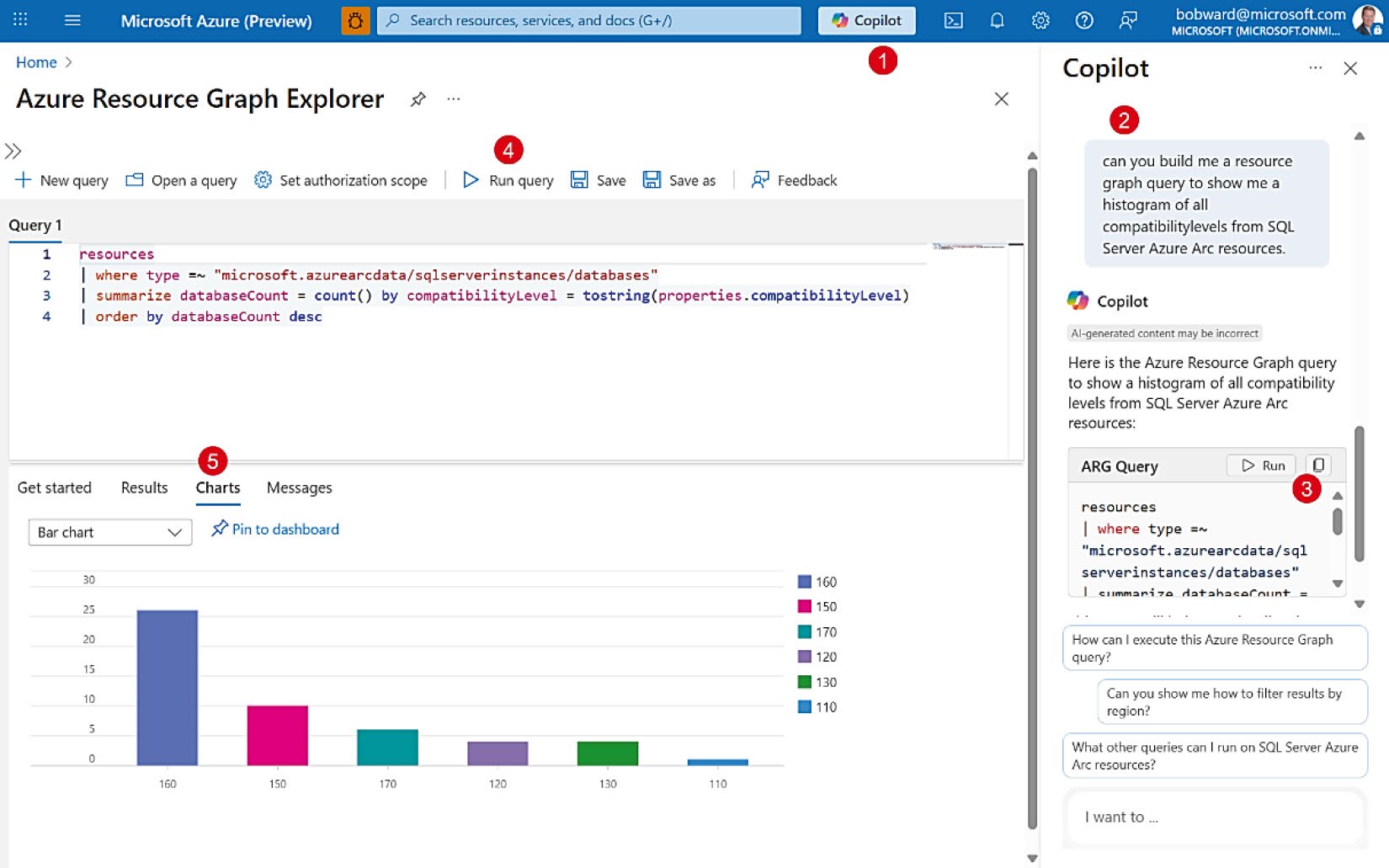
Figure 6-10: 透過 Copilot 跨所有 SQL Server 查詢 dbcompat
應用情境二:License Type 與 ESU#
PAYG 適合:
- 使用頻率低的 SQL Server——關機就不收授權費用
- 需要 ESU 的舊版本——以 Azure 訂閱按月支付
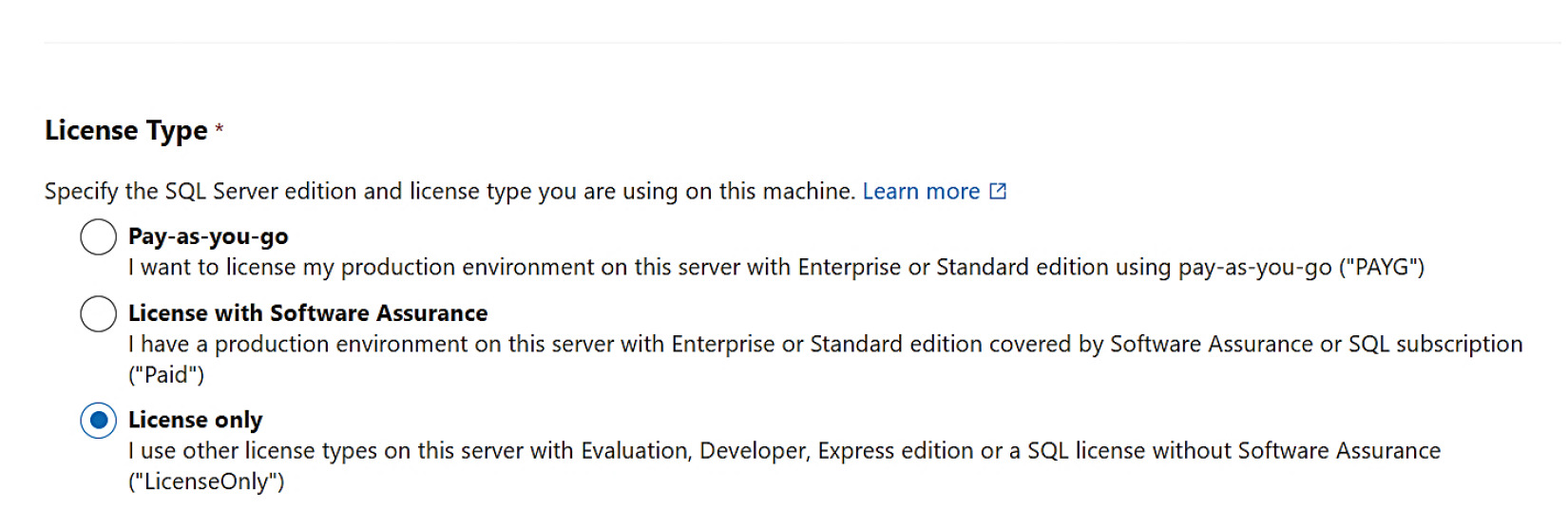
Figure 6-11: 在 Azure Arc 中選擇授權類型
ESU 詳情:https://learn.microsoft.com/sql/sql-server/azure-arc/extended-security-updates
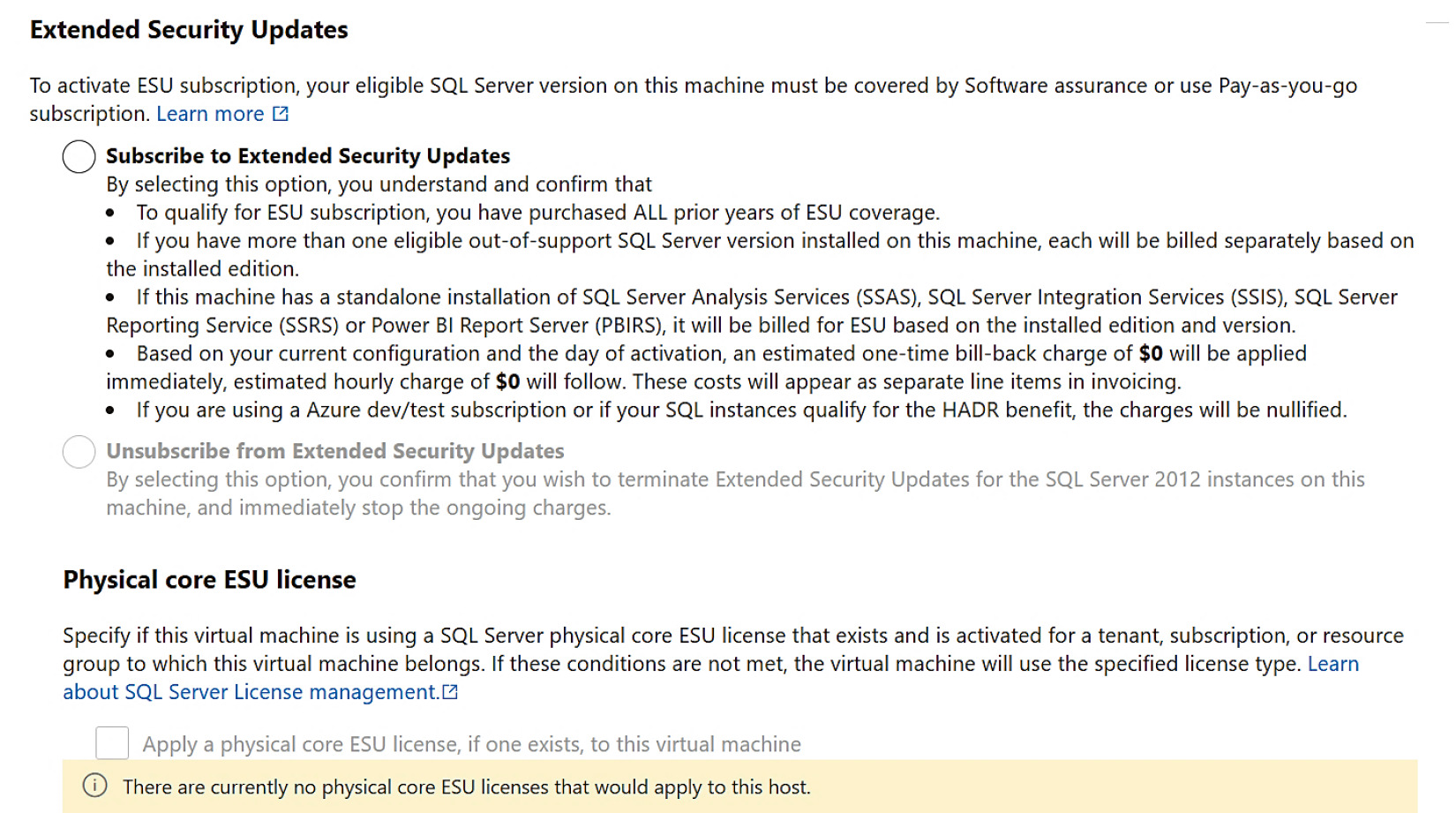
Figure 6-12: 透過 Azure Arc 啟用 ESU
應用情境三:用 Microsoft Entra 強化 SQL Server 安全#
Microsoft Entra(前 Azure AD)#
Microsoft Entra 是 Microsoft 託管的「網域控制器」服務,提供:
- 跨地端到雲端的一致認證平台
- 多重要素驗證(Multi-factor Authentication, MFA)
- 透過 Managed Identity 達成 passwordless
與本機 Active Directory 不同,Entra 是 ground to cloud to fabric 一致的平台。
SQL Server 2022 已支援 Microsoft Entra(即使非 Azure 環境),SQL Server 2025 + Azure Arc 進一步深度整合:Entra 物件(包括 Managed Identity)成為 SQL Server 認證與權限的 securable。SQL Server 引擎透過 Windows registry 或 mssql.conf(由 Azure extension 維護)取得連 Entra 的 metadata。
設定 Entra Admin#
前置條件#
- 建立 Azure Key Vault(AKV)
- 訂閱具 Contributor 權限(若你是 owner 則免)
新版改進:可從 Azure Portal 直接設定 Entra admin,自動配置 Key Vault 憑證與 Entra application。
教學:
https://learn.microsoft.com/sql/relational-databases/security/authentication-access/azure-ad-authentication-sql-server-automation-setup-tutorial
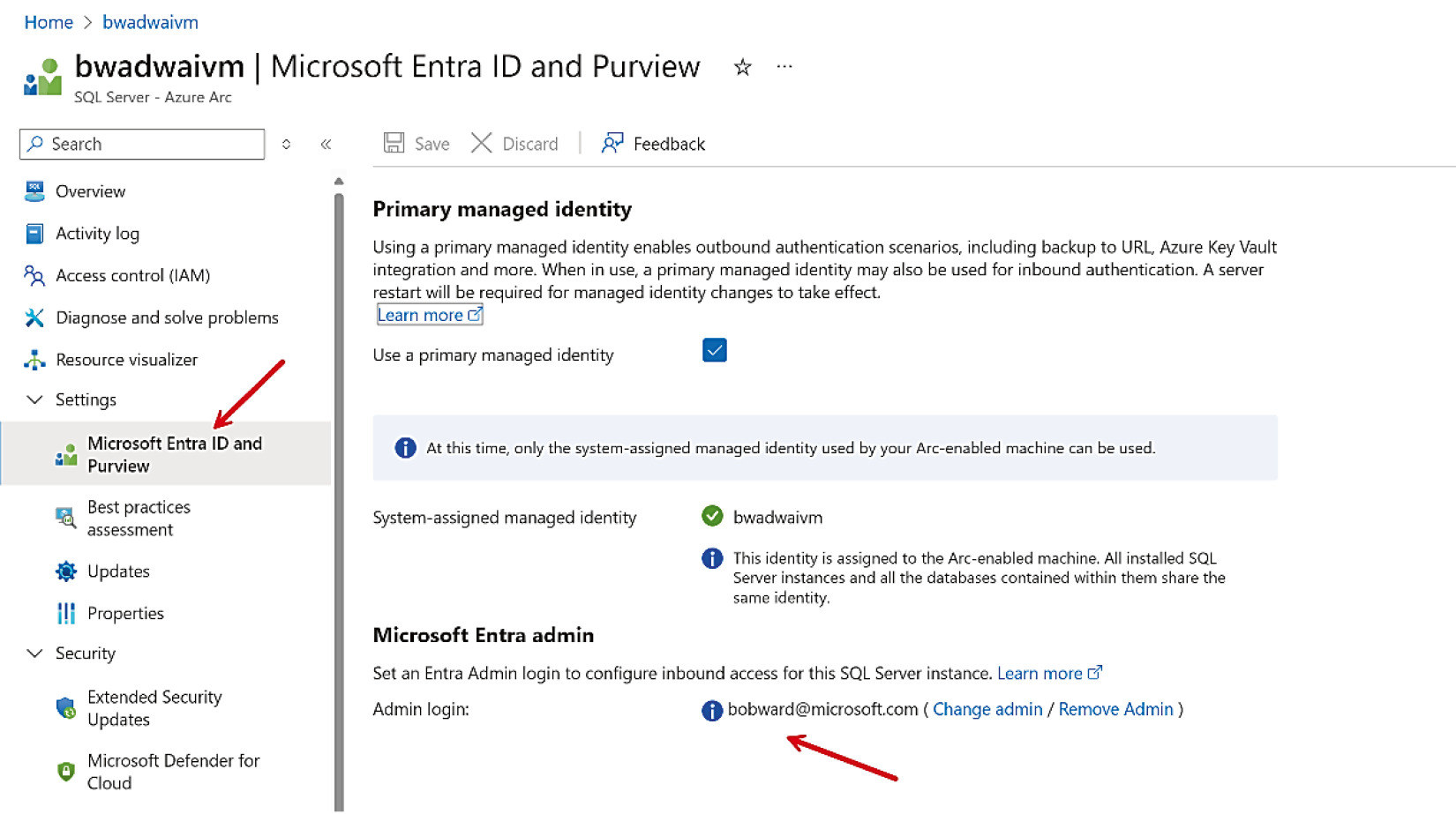
Figure 6-13: Microsoft Entra 設定成功
用 SSMS + MFA 登入#
設定完成後,在 SSMS 新版連線對話框中以 Microsoft Entra(含 MFA)登入。新增的登入或使用者語法:
CREATE LOGIN [user@contoso.com] FROM EXTERNAL PROVIDER;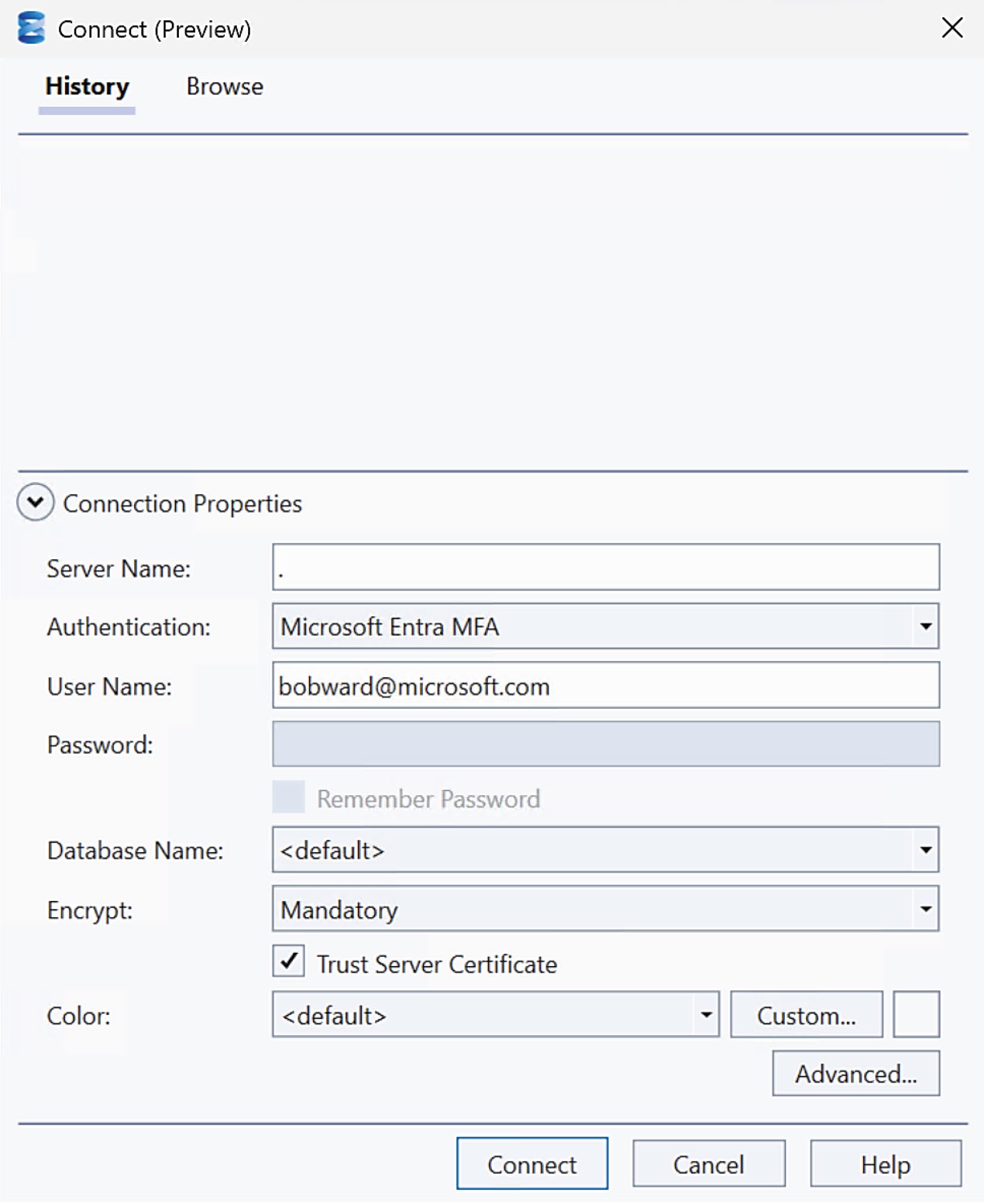
Figure 6-14: 透過 SSMS 以 Microsoft Entra MFA 登入
Entra 的有趣特色:可以直接建立資料庫使用者,不必先建 login。
應用情境四:用 Managed Identity 走向 Passwordless#
為何引入 Managed Identity#
第 4 章中,連線 Azure AI Foundry 用的是 API key——這仍屬於明文密碼類的方式。Managed Identity 是更安全的選擇:
- 應用程式向 Microsoft Entra 申請 token,再用 token 存取已指派的 Azure 資源
- 沒有憑證、沒有密碼
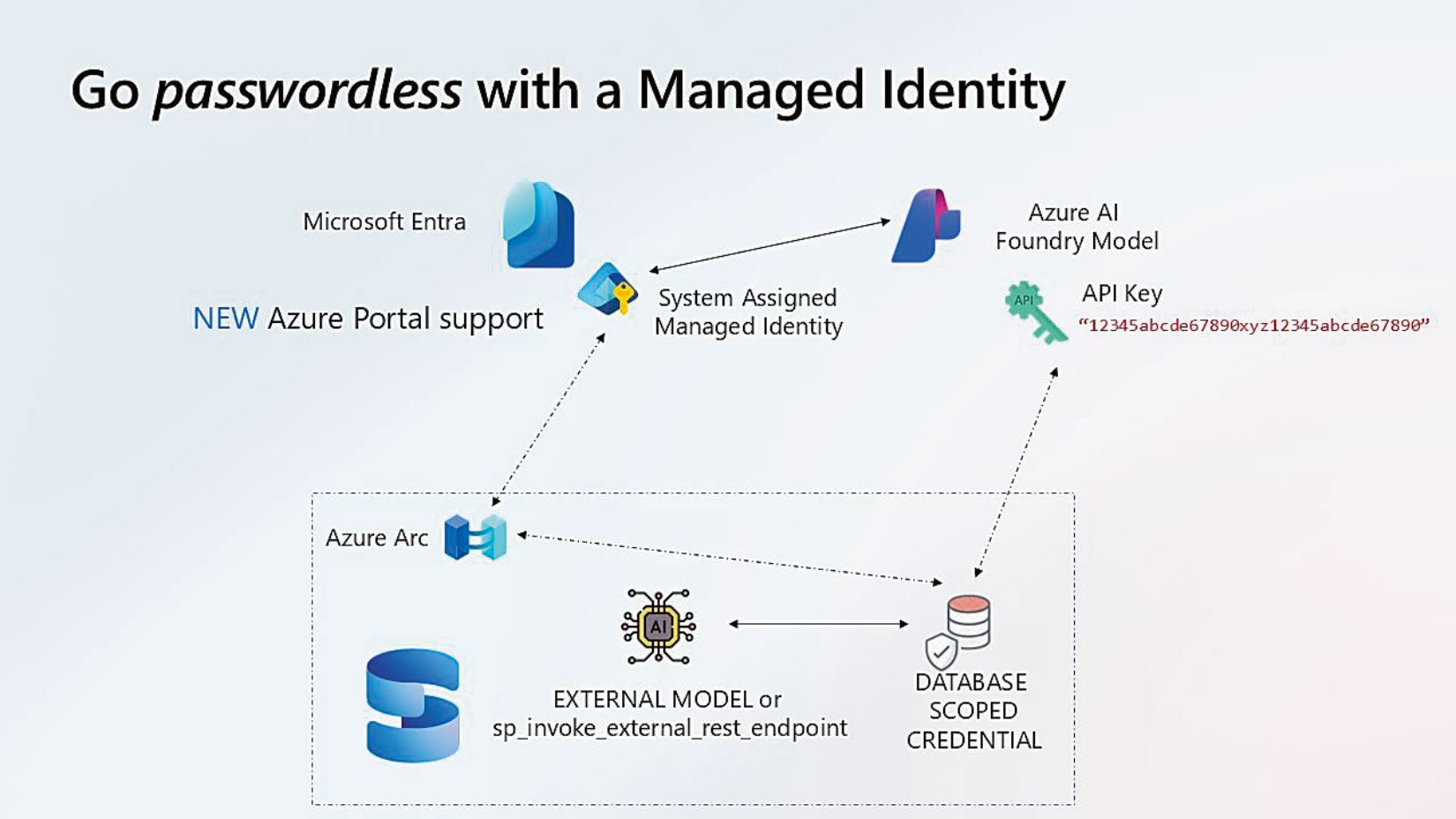
Figure 6-15: 使用 Managed Identity 存取 Azure AI
兩種 Managed Identity#
| 類型 | 特性 |
|---|---|
| System-assigned | 與某個 Azure 資源生命週期綁定 |
| User-assigned | 獨立物件,可被多個資源共用 |
SQL Server enabled by Azure Arc 目前支援 system-assigned Managed Identity。
前述 Azure Portal 自動化體驗也會把 system-assigned Managed Identity 與 SQL Server instance 綁定。
System-assigned Managed Identity 可同時用於:
- Inbound:登入 SQL Server
- Outbound:從 SQL Server 呼叫 Azure Storage、Key Vault、Azure AI 等資源
確認 SQL Server 是否識別 Managed Identity:
SELECT * FROM sys.dm_server_managed_identities;
範例:用 Managed Identity 取代 API Key 存取 Azure OpenAI#
延續第 4 章的 Azure AI Foundry 範例:
1. 啟用伺服器層級設定#
EXECUTE sp_configure 'allow server scoped db credentials', 1;
RECONFIGURE WITH OVERRIDE;
2. 在 Azure 端授權 Managed Identity#
- 在 Azure Portal 找到目標 Azure OpenAI 服務(範例叫
productsopenai) - 進入 Access control (IAM) ➜ Add role assignment
- 角色:Cognitive Services OpenAI Contributor
- 指派對象:對應的 Machine - Azure Arc 系統指派的 Managed Identity
3. 改建 database scoped credential 與 external model#
USE AdventureWorks;

DROP EXTERNAL MODEL MyAzureOpenAIEmbeddingModel;
DROP DATABASE SCOPED CREDENTIAL [https://<azureaiservice>.openai.azure.com];

CREATE DATABASE SCOPED CREDENTIAL [https://<azureaiservice>.openai.azure.com]
    WITH IDENTITY = 'Managed Identity',
         SECRET = '{"resourceid":"https://cognitiveservices.azure.com"}';

CREATE EXTERNAL MODEL MyAzureOpenAIEmbeddingModel
WITH (
    LOCATION = 'https://<azureaiservice>.openai.azure.com/openai/deployments/text-embedding-ada-002/embeddings?api-version=2023-05-15',
    API_FORMAT = 'Azure OpenAI',
    MODEL_TYPE = EMBEDDINGS,
    MODEL = 'text-embedding-ada-002',
    CREDENTIAL = [https://<azureaiservice>.openai.azure.com]
);
4. 驗證#
不用重建 embeddings,直接重新執行第 4 章的 prompt 測試:若 AI_GENERATE_EMBEDDINGS 成功,代表 Managed Identity credential 已成功運作。
更多 SQL Server 2025 安全相關功能:
https://learn.microsoft.com/sql/sql-server/what-s-new-in-sql-server-2025#security
SQL 與世界連線#
「只要在機器上安裝 Azure Arc agent,OS、硬體、SQL Server instance、資料庫、availability group 的細節就會發布到 Azure,建構一個隨時可從任何地方安全存取的 inventory 管理系統。自動化 patching、備份、point-in-time restore、效能監控、最佳實踐評估都從 Azure Portal 取得。Entra ID 認證與 Managed Identity 帶來無密碼的入站/出站體驗。客戶可改用 PAYG 簡化授權、依需求伸縮,並用內建自動化評估工具獲得最佳遷移建議。」
— Travis Wright,Microsoft Partner Group Engineering Manager
SQL Server 不只「連到」Azure,而是「整合」進 Azure,獲得:
- 受管的災難復原(managed disaster recovery)
- 接近即時的分析
- 集中化的安全與治理
下一章將深入 SQL Server 引擎,看看 SQL Server 2025 為核心引擎帶來了哪些創新。