本章探討**餐廳管理系統(Restaurant Management System)**的設計。目標是建立代表選單、訂位、桌次等元件的類別。系統需支援預約訂位、管理訂單、分配桌次,並保持設計簡潔且易於擴展。
需求蒐集#
題目情境#
想像你規劃週五晚的餐聚。你致電餐廳訂位、查可用時段、確認位置。到達時店員依預約安排桌次、接受點餐、最後出帳。背景中,系統處理訂位、追蹤訂單、計算費用。請設計這樣的系統。
需求釐清對話#
Candidate:先設定範圍。系統處理訂位、選單、訂單追蹤、付款。我先聚焦訂位與訂單管理可以嗎?
Interviewer:合理的起點。
Candidate:顧客可建立與管理訂位嗎?
Interviewer:可以,依可用性訂未來日期與時間。
Candidate:如何判斷桌次可用?
Interviewer:找一張容納人數且該時段未被預訂的桌。每筆訂位佔用桌一小時。
Candidate:可取消訂位嗎?
Interviewer:可以。
Candidate:有預約者抵達時自動取得預約桌?
Interviewer:是。以姓名查詢已分配的桌。
Candidate:未預約的 walk-in 怎麼處理?
Interviewer:依現有可用性與人數分派桌次。
Candidate:訂單下單後可變更或移除嗎?
Interviewer:可以,能移除品項或調整數量。
Candidate:系統追蹤訂單狀態嗎?
Interviewer:是的。
Candidate:結帳要拆帳嗎?
Interviewer:先呈現單一總金額即可。
需求整理#
訂位#
- 顧客可依可用性預訂未來日期/時間
- 每筆訂位佔用一小時
- 系統檢查目標時段桌次是否無重疊預訂
- 系統為訂位指派桌次;顧客以姓名認領
- 顧客可取消訂位
Walk-in 入座#
- 依當下可用性與人數指派 walk-in 桌次
訂單管理#
- 下單後可變更或移除
- 系統追蹤訂單進度
結帳#
- 結帳呈現單一總金額
非功能性需求#
- 在尖峰時段(如週末晚上)能流暢處理高流量
辨識核心物件#
- Menu:儲存可點品項集合
- MenuItem:單一品項,封裝名稱與價格
- Layout:餐廳實體配置,組織所有桌次以快速分派
- Table:單一桌次,含容量、目前訂位、進行中訂單
- Reservation:訂位細節(姓名、人數、時間、指派桌)
- ReservationManager:管理所有訂位,檢查可用性並與
Layout協作分派桌次 - Restaurant:作為 facade 提供管理訂位、桌次、訂單、結帳的中央介面
類別圖設計#
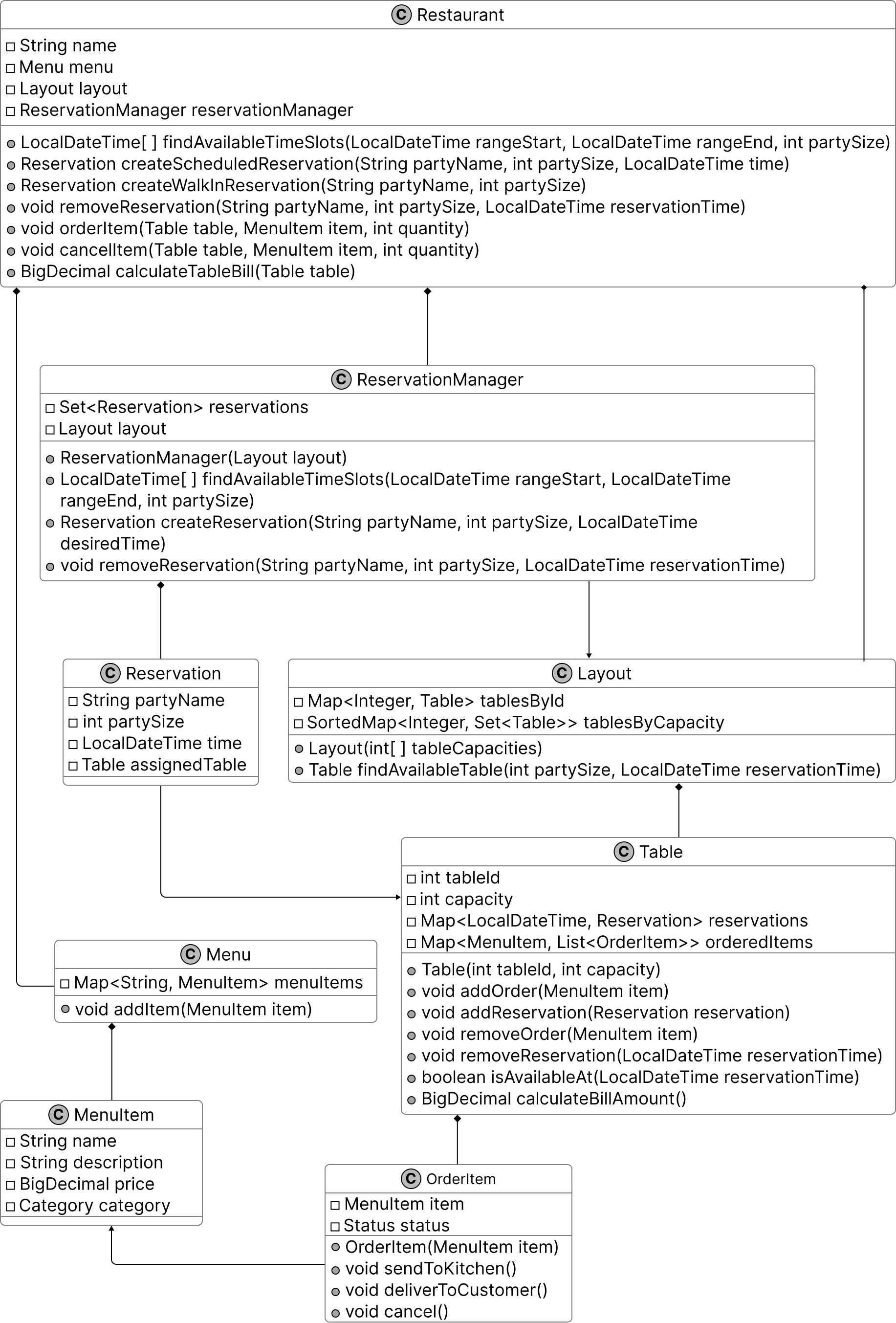
Menu#
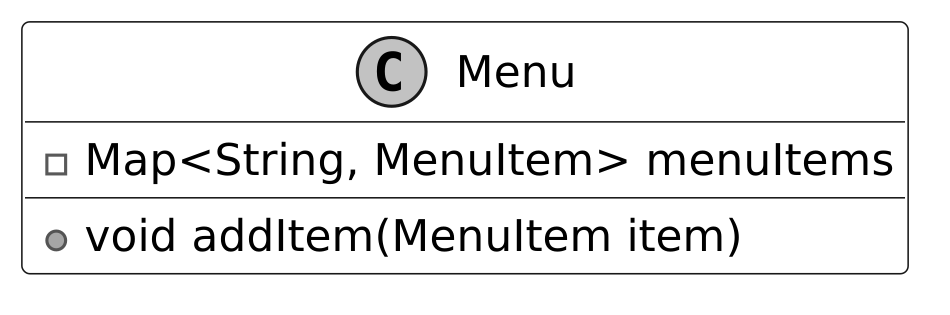
Menu 以名稱為 key 將品項存於 map 中,支援快速查找。
MenuItem#
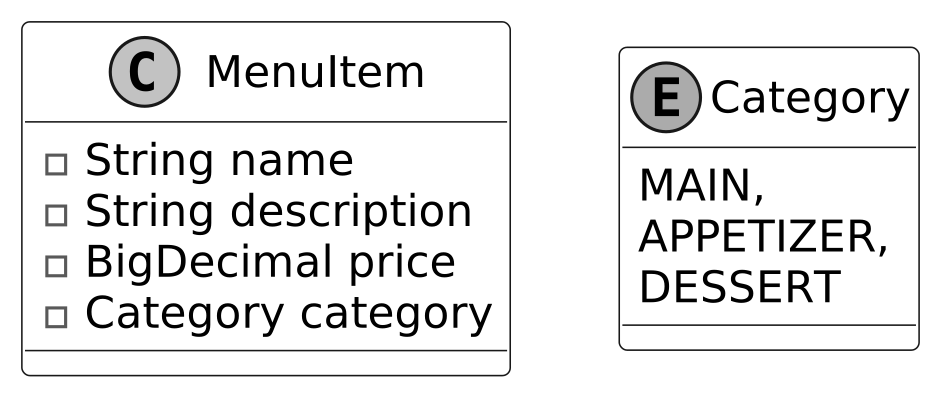
MenuItem 定義單一品項,含名稱、描述、價格、分類。Category enum 賦予類型(main course、appetizer、dessert)。
Table#
Table 模擬餐廳桌次。部分屬性少變動(capacity、tableId),其他則代表會隨時間變動的當前狀態(reservations、orderedItems)。
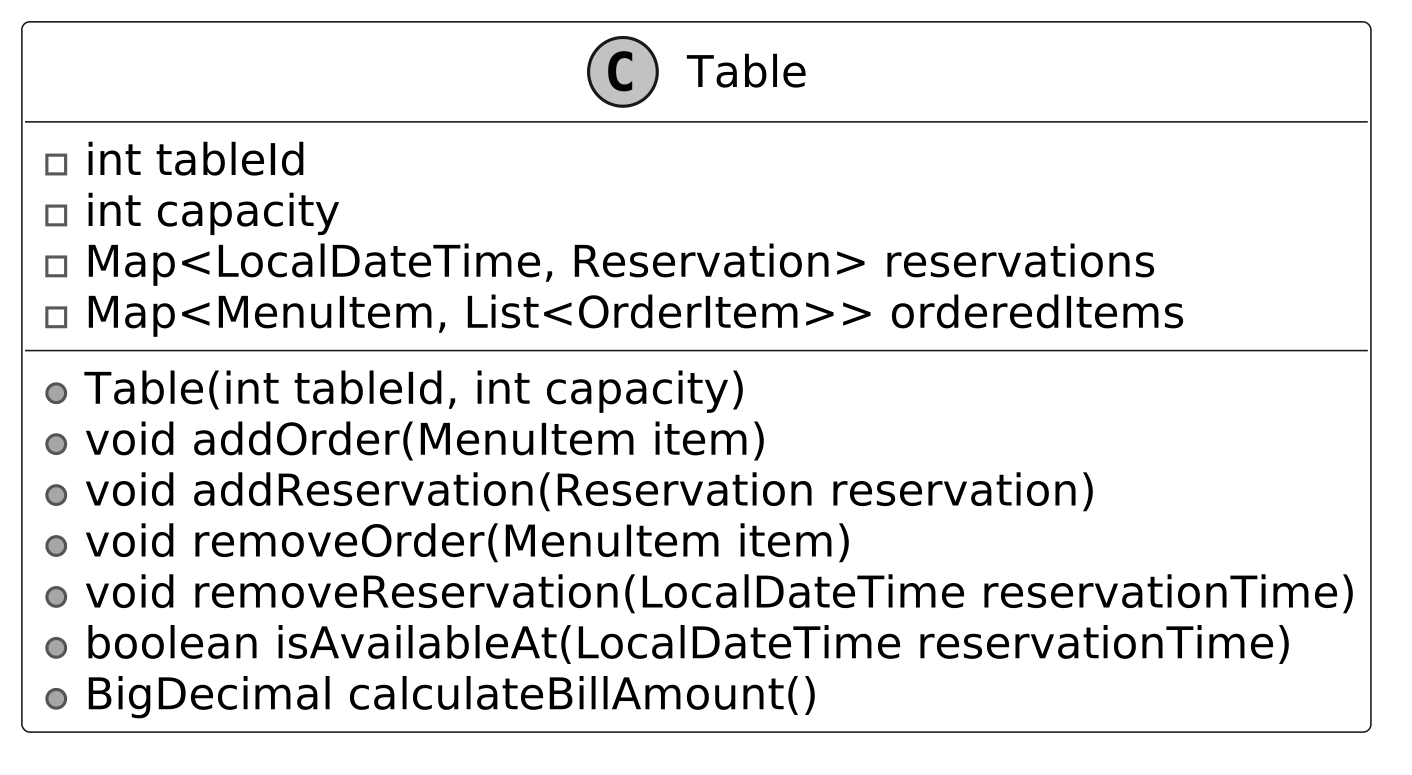
它管理桌次目前使用狀況,與 Layout 協作做可用性檢查、與 OrderItem 處理訂單。
Layout#
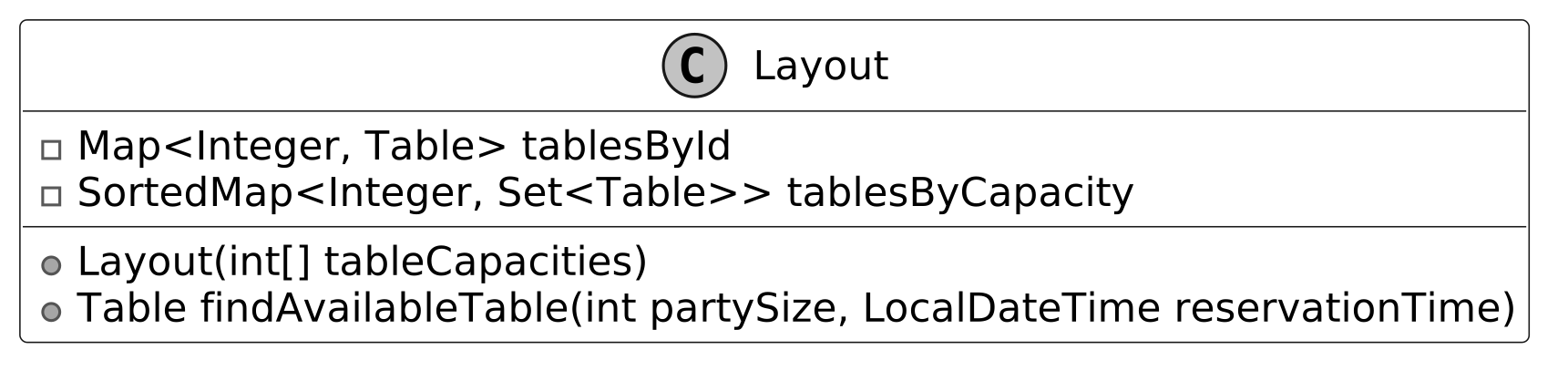
Layout 監督所有桌次,依 ID 與容量組織以便為每筆訂位找到合適的桌。
Design Choice:將桌次組織獨立於
Layout是為了最佳化分派效率,並與選單/訂單邏輯分離。若把桌次分派整合進Restaurant,雖能簡化結構,但會讓 facade 同時處理高層協調與低層管理。
OrderItem#
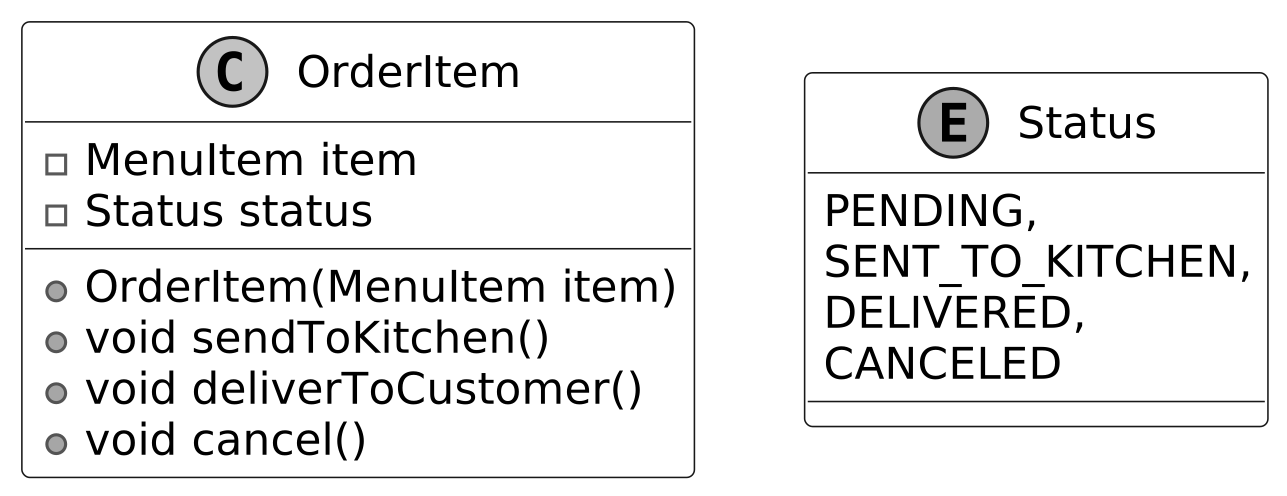
OrderItem 代表顧客點的單一品項,連結到 MenuItem。它追蹤品項狀態,讓 Table 能計算費用與管理品項。Status enum(pending、delivered…)表示目前狀態。
ReservationManager#
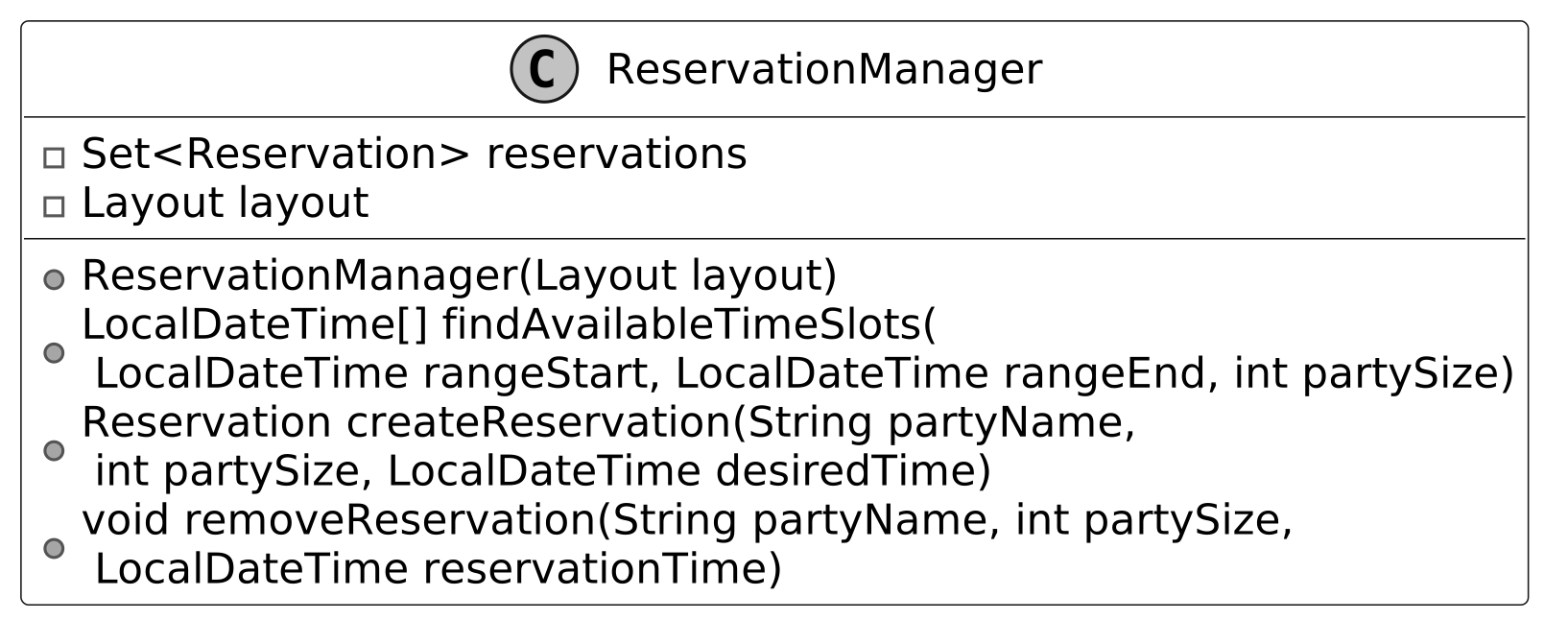
ReservationManager 處理訂位排程——尋找可用時段、建立訂位、處理取消。它儲存 Reservation 物件並透過 Layout 分配桌次。
Reservation#
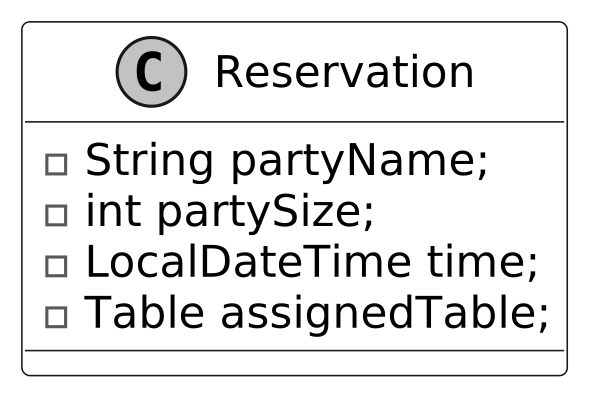
Reservation 儲存單筆預訂細節:姓名、人數、時間、指派桌次。
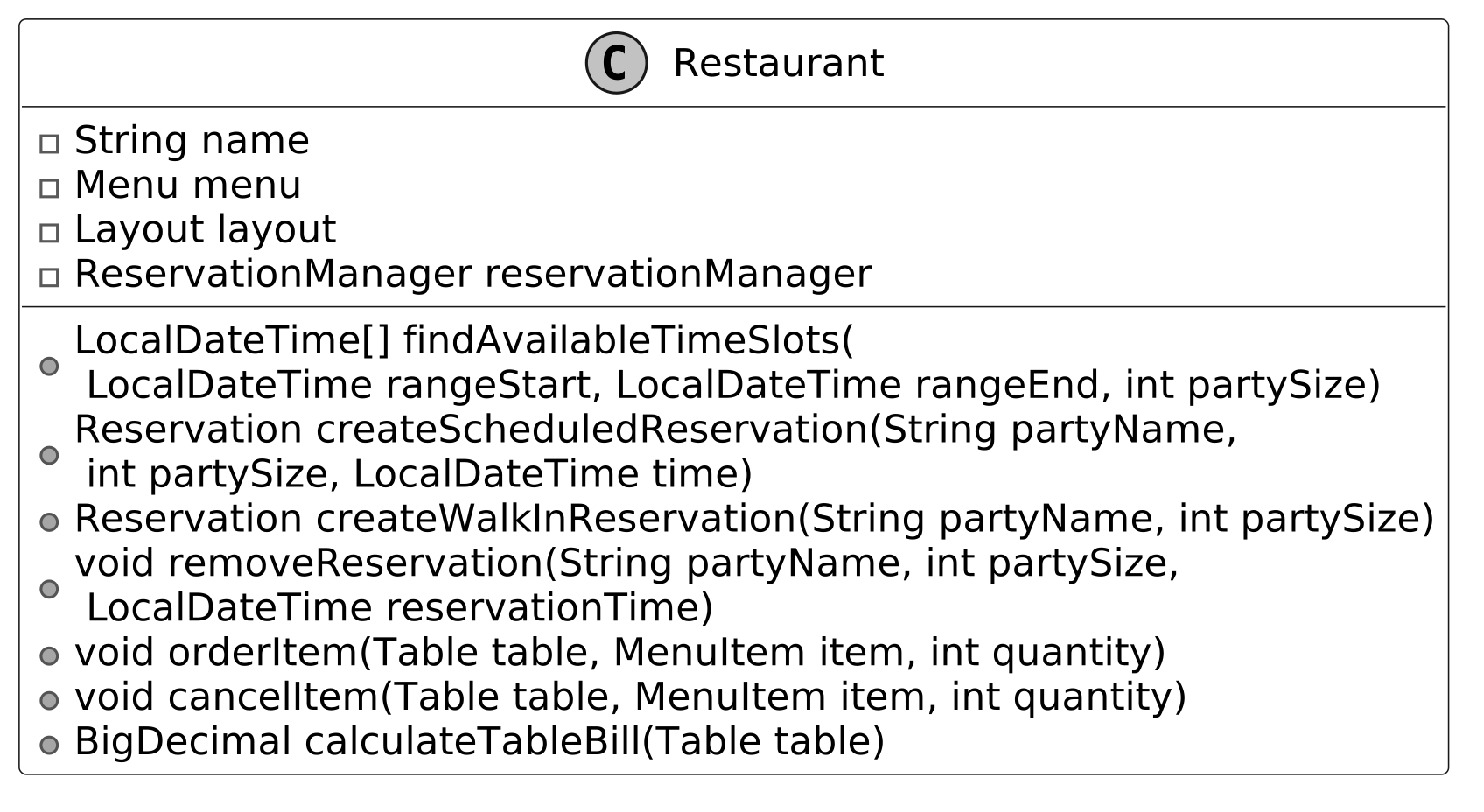
Restaurant#
Restaurant 作為系統的主要介面與 facade,協調訂位、桌次分派、訂單、結帳:
- ReservationManager:排程與取消訂位
- Layout(透過 ReservationManager):辨識可用桌次
- Menu:提供訂單品項
- Table:訂單與帳單處理
Design Choice:將
Restaurant設計為 facade 統一系統操作。若把所有邏輯內建於Restaurant,會增加複雜度並降低可擴展性。
完整類別圖#
程式實作#
Menu#
Implementation Choice:用
HashMap提供以 key 為基礎的快速查找;List則需線性搜尋。
public class Menu {
    private final Map<String, MenuItem> menuItems = new HashMap<>();

    // Adds a new item to the menu
    public void addItem(MenuItem item) {
        menuItems.put(item.getName(), item);
    }

    public MenuItem getItem(String name) {
        return menuItems.get(name);
    }

    public Map<String, MenuItem> getMenuItems() {
        return Collections.unmodifiableMap(menuItems);
    }
}MenuItem#
MenuItem 以 private final 欄位確保不可變性。價格用 BigDecimal 提供精確控制,避免浮點捨入錯誤。
// Represents a single item available on the restaurant menu
public class MenuItem {
    private final String name;
    private final String description;
    private final BigDecimal price;
    private final Category category;

    public MenuItem(String name, String description, BigDecimal price, Category category) {
        this.name = name;
        this.description = description;
        this.price = price;
        this.category = category;
    }

    // Enumeration of possible menu item categories
    public enum Category {
        MAIN,
        APPETIZER,
        DESSERT
    } // getter methods are omitted for brevity
}Table#
// Represents a table in the restaurant with its properties and current state
public class Table {
    // immutable properties
    private final int tableId;
    private final int capacity;

    // current state
    private final Map<LocalDateTime, Reservation> reservations = new HashMap<>();
    private final Map<MenuItem, List<OrderItem>> orderedItems = new HashMap<>();

    public Table(int tableId, int capacity) {
        this.tableId = tableId;
        this.capacity = capacity;
    }

    // Calculates the total bill amount for all ordered items at this table
    public BigDecimal calculateBillAmount() {
        return orderedItems.values().stream()
                .flatMap(List::stream)
                .map(OrderItem::getItem)
                .map(MenuItem::getPrice)
                .reduce(BigDecimal.ZERO, BigDecimal::add);
    }

    // Adds multiple orders of the same menu item to the table
    public void addOrder(MenuItem item, int quantity) {
        for (int i = 0; i < quantity; i++) {
            addOrder(item);
        }
    }

    // Adds a single menu item to the table's order
    public void addOrder(MenuItem item) {
        List<OrderItem> orderItems = orderedItems.get(item);
        if (orderItems == null) {
            orderItems = new ArrayList<>();
            orderedItems.put(item, orderItems);
            orderItems.add(new OrderItem(item));
        } else {
            orderItems.add(new OrderItem(item));
        }
    }

    // Removes a menu item from the table's order
    public void removeOrder(MenuItem item) {
        List<OrderItem> orderItems = orderedItems.get(item);
        if (orderItems != null) {
            orderItems.remove(0);
            if (orderItems.isEmpty()) {
                orderedItems.remove(item);
            }
        }
    }

    // Checks if the table is available at a specific time
    public boolean isAvailableAt(LocalDateTime reservationTime) {
        return !reservations.containsKey(reservationTime);
    }

    // Adds a reservation to this table
    public void addReservation(Reservation reservation) {
        reservations.put(reservation.getTime(), reservation);
    }

    // Removes a reservation from this table for a specific time
    public void removeReservation(LocalDateTime reservationTime) {
        reservations.remove(reservationTime);
    }

    // getter methods are omitted for brevity
}
關鍵結構:
- Map(reservation time → Reservation):快速可用性檢查
- Map(MenuItem → OrderItem list):管理訂單,支援
addOrder、removeOrder、calculateBillAmount
Layout#
Layout 用兩種索引方式管理所有桌次:
- 依 ID(tablesById):以唯一 ID 快速取得
- 依容量(tablesByCapacity):用
SortedMap將容量映射到桌集合,讓findAvailableTable能快速找到最小可用桌
// Manages the collection of tables in the restaurant and their arrangement
public class Layout {
    private final Map<Integer, Table> tablesById = new HashMap<>();
    // Groups tables by their capacity for efficient table assignment, sorted from smallest to
    // largest capacity
    private final SortedMap<Integer, Set<Table>> tablesByCapacity = new TreeMap<>();

    public Layout(List<Integer> tableCapacities) {
        for (int i = 0; i < tableCapacities.size(); i++) {
            int capacity = tableCapacities.get(i);
            Table table = new Table(i, capacity);
            tablesById.put(i, table);
            tablesByCapacity.computeIfAbsent(capacity, k -> new HashSet<>()).add(table);
        }
    }

    // Finds the smallest available table that can accommodate a party of the given size at the
    // given time
    public Table findAvailableTable(int partySize, LocalDateTime reservationTime) {
        for (Set<Table> tables : tablesByCapacity.tailMap(partySize).values()) {
            for (Table table : tables) {
                if (table.isAvailableAt(reservationTime)) {
                    return table;
                }
            }
        }
        return null;
    }
}
Implementation Choice:
SortedMap提供有序的 key 存取,便於依容量做範圍搜尋——對findAvailableTable配對人數至關重要。基本Map則需額外邏輯找最小合適桌。
OrderItem#
狀態轉移方法:
sendToKitchen:PENDING→SENT_TO_KITCHENdeliverToCustomer:SENT_TO_KITCHEN→DELIVEREDcancel:未送達時設為CANCELED
// Represents a food item ordered by a customer with its current status in the order process
public class OrderItem {
    private final MenuItem item;
    private Status status = Status.PENDING;

    public OrderItem(MenuItem item) {
        this.item = item;
    }

    // Updates the status to indicate the item has been sent to the kitchen
    public void sendToKitchen() {
        if (status == Status.PENDING) status = Status.SENT_TO_KITCHEN;
    }

    // Updates the status to indicate the item has been delivered to the customer
    public void deliverToCustomer() {
        if (status == Status.SENT_TO_KITCHEN) status = Status.DELIVERED;
    }

    // Updates the status to indicate the item has been canceled
    public void cancel() {
        if (status == Status.PENDING || status == Status.SENT_TO_KITCHEN) {
            status = Status.CANCELED;
        }
    }

    // getter methods are omitted for brevity
}ReservationManager#
// Manages all reservations for the restaurant and handles table assignments
public class ReservationManager {
    private final Layout layout;
    private final Set<Reservation> reservations = new HashSet<>();

    // Constructor that takes the restaurant's table layout
    public ReservationManager(Layout layout) {
        this.layout = layout;
    }

    // Finds potential time slots for a reservation within the given time range and party size
    public LocalDateTime[] findAvailableTimeSlots(
            LocalDateTime rangeStart, LocalDateTime rangeEnd, int partySize) {
        // checking every hour in the time range
        LocalDateTime current = rangeStart;
        List<LocalDateTime> possibleReservations = new ArrayList<>();
        while (!current.isAfter(rangeEnd)) {
            Table availableTable = layout.findAvailableTable(partySize, current);
            if (availableTable != null) {
                possibleReservations.add(current);
            }
            current = current.plusHours(1);
        }
        return possibleReservations.toArray(new LocalDateTime[0]);
    }

    // Creates a reservation for a specific time, party size and name
    public Reservation createReservation(
            String partyName, int partySize, LocalDateTime desiredTime) {
        desiredTime = desiredTime.truncatedTo(ChronoUnit.HOURS);
        Table table = layout.findAvailableTable(partySize, desiredTime);
        Reservation reservation = new Reservation(partyName, partySize, desiredTime, table);
        table.addReservation(reservation);
        reservations.add(reservation);
        return reservation;
    }

    // Removes an existing reservation
    public void removeReservation(
            String partyName, int partySize, LocalDateTime reservationTime) {
        // Find matching reservation before removing it
        for (Reservation reservation : new HashSet<>(reservations)) {
            if (reservation.getTime().equals(reservationTime)
                    && reservation.getPartySize() == partySize
                    && reservation.getPartyName().equals(partyName)) {
                // Clear the reservation from the table first
                Table table = reservation.getAssignedTable();
                table.removeReservation(reservationTime);
                // Then remove from the reservation collection
                reservations.remove(reservation);
                return;
            }
        }
    }
    // getter methods are omitted for brevity
}
Implementation Choice:用
Set儲存Reservation防止重複預訂。List需額外檢查;以時間為 key 的Map雖加快查找但需複合 key 才能正確處理移除。
Reservation#
// Represents a reservation made at the restaurant for a specific party, time and table
public class Reservation {
    private final String partyName;
    private final int partySize;
    private final LocalDateTime time;
    private final Table assignedTable;

    public Reservation(
            String partyName, int partySize, LocalDateTime time, Table assignedTable) {
        this.partyName = partyName;
        this.partySize = partySize;
        this.time = time;
        this.assignedTable = assignedTable;
    }

    // getter methods are omitted for brevity
}Restaurant#
// Main restaurant class that manages reservations, orders, and tables
public class Restaurant {
    private final String name;
    private final Menu menu;
    private final Layout layout;
    private final ReservationManager reservationManager;

    public Restaurant(String name, Menu menu, Layout layout) {
        this.name = name;
        this.menu = menu;
        this.layout = layout;
        this.reservationManager = new ReservationManager(layout);
    }

    // Finds possible reservation times within a time range for a party of specified size
    public LocalDateTime[] findAvailableTimeSlots(
            LocalDateTime rangeStart, LocalDateTime rangeEnd, int partySize) {
        return reservationManager.findAvailableTimeSlots(rangeStart, rangeEnd, partySize);
    }

    // Creates a reservation for a party at the specified time
    public Reservation createScheduledReservation(
            String partyName, int partySize, LocalDateTime time) {
        return reservationManager.createReservation(partyName, partySize, time);
    }

    // Removes an existing reservation
    public void removeReservation(
            String partyName, int partySize, LocalDateTime reservationTime) {
        reservationManager.removeReservation(partyName, partySize, reservationTime);
    }

    // Creates a reservation for a party without prior reservation
    public Reservation createWalkInReservation(String partyName, int partySize) {
        return reservationManager.createReservation(partyName, partySize, LocalDateTime.now());
    }

    // Adds an item to a table's order
    public void orderItem(Table table, MenuItem item) {
        table.addOrder(item);
    }

    // Removes an item from a table's order
    public void cancelItem(Table table, MenuItem item) {
        table.removeOrder(item);
    }

    // Calculates the bill amount for a table
    public BigDecimal calculateTableBill(Table table) {
        return table.calculateBillAmount();
    }

    // getter methods are omitted for brevity
}
關鍵特性:
- 訂位方法:
findAvailableTimeSlots、createScheduledReservation、removeReservation,皆委派給ReservationManager - Walk-in 入座:
createWalkInReservation - 訂單管理:
orderItem與cancelItem委派給Table - 結帳:
calculateTableBill委派給Table.calculateBillAmount
Implementation Choice:
Restaurant設為 facade 不持有自己的資料結構,所有操作皆委派。內建訂位或訂單會增加複雜度並降低模組化。
深度討論#
訂單佇列追蹤#
在高流量情境下(如週五晚),現有系統由 Table 直接管理 OrderItem 狀態。這種去中心化結構缺乏跨桌訂單進度的整體視圖,店員難以:
- 優先處理時間敏感的訂單
- 監控廚房延遲
- 不逐桌檢查就能驗證取消
我們引入集中式的 OrderManager 類別來佇列與處理訂單動作。
Step 1:定義 Command 介面#
public interface OrderCommand {
    void execute();
}
Step 2:實作具體 Command#
每個任務有自己的類別,與原系統 Table 直接更新 OrderItem 狀態不同:
- SendToKitchenCommand:呼叫
sendToKitchen() - DeliverCommand:呼叫
deliverToCustomer() - CancelCommand:呼叫
cancel()
// Command that handles sending order items to the Kitchen
public class SendToKitchenCommand implements OrderCommand {
    private final OrderItem orderItem;

    public SendToKitchenCommand(OrderItem orderItem) {
        this.orderItem = orderItem;
    }

    @Override
    public void execute() {
        orderItem.sendToKitchen();
    }
}

// Command that handles delivery of order items
public class DeliverCommand implements OrderCommand {
    private final OrderItem orderItem;

    public DeliverCommand(OrderItem orderItem) {
        this.orderItem = orderItem;
    }

    @Override
    public void execute() {
        orderItem.deliverToCustomer();
    }
}

// Command that handles cancellations of order items
public class CancelCommand implements OrderCommand {
    private final OrderItem orderItem;

    public CancelCommand(OrderItem orderItem) {
        this.orderItem = orderItem;
    }

    @Override
    public void execute() {
        orderItem.cancel();
    }
}
Step 3:引入 OrderManager#
public class OrderManager {
    private final List<OrderCommand> commandQueue = new ArrayList<>();

    // Adds a command to the queue for later execution
    public void addCommand(OrderCommand command) {
        commandQueue.add(command);
    }

    // Executes all commands in the queue and clears it
    public void executeCommands() {
        for (OrderCommand command : commandQueue) {
            command.execute();
        }
        commandQueue.clear();
    }
}
Step 4:整合到 Restaurant#
public class Restaurant {
    // ... fields unchanged ...
    private final OrderManager orderManager;

    public Restaurant(String name, Menu menu, Layout layout) {
        // ... fields unchanged ...
        this.orderManager = new OrderManager();
    }

    // Adds an item to a table's order and sends it to the kitchen
    public void orderItem(Table table, MenuItem item) {
        table.addOrder(item);
        // Get the last added order item
        List<OrderItem> orderItems = table.getOrderedItems().get(item);
        if (orderItems != null && !orderItems.isEmpty()) {
            OrderItem lastOrder = orderItems.get(orderItems.size() - 1);
            OrderCommand sendToKitchen = new SendToKitchenCommand(lastOrder);
            orderManager.addCommand(sendToKitchen);
            orderManager.executeCommands();
        }
    }

    // Removes an item from a table's order and cancels it
    public void cancelItem(Table table, MenuItem item) {
        List<OrderItem> orderItems = table.getOrderedItems().get(item);
        if (orderItems != null && !orderItems.isEmpty()) {
            OrderItem lastOrder = orderItems.get(orderItems.size() - 1);
            OrderCommand cancelOrder = new CancelCommand(lastOrder);
            orderManager.addCommand(cancelOrder);
            orderManager.executeCommands();
            table.removeOrder(item);
        }
    }

    // Delivers an item to the customer
    public void deliverItem(Table table, MenuItem item) {
        List<OrderItem> orderItems = table.getOrderedItems().get(item);
        if (orderItems != null && !orderItems.isEmpty()) {
            OrderItem lastOrder = orderItems.get(orderItems.size() - 1);
            OrderCommand deliverOrder = new DeliverCommand(lastOrder);
            orderManager.addCommand(deliverOrder);
            orderManager.executeCommands();
        }
    }
    // ... other methods unchanged ...
}
Command Pattern#
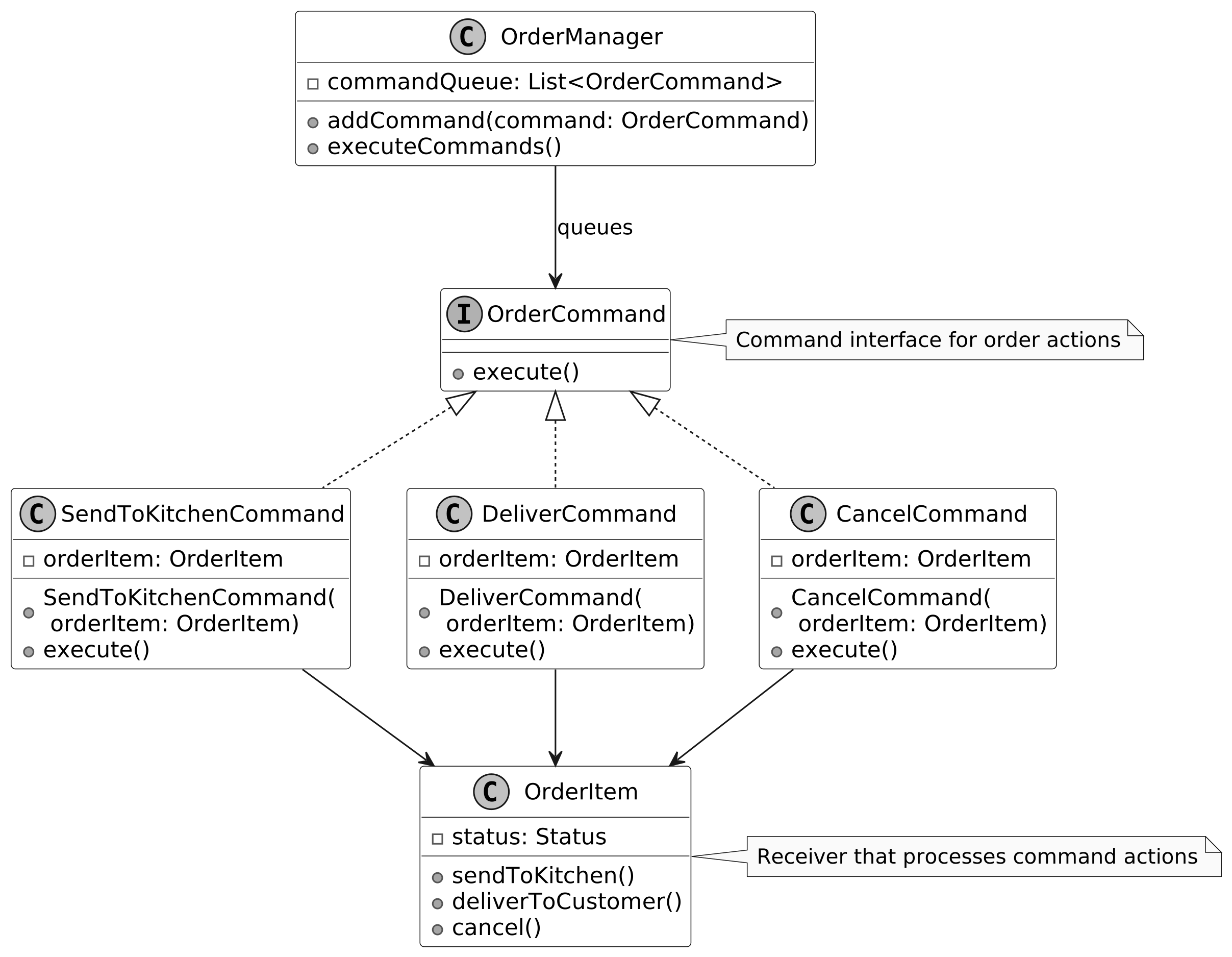
我們所實作的正是 Command Pattern——一種行為型設計模式,將請求封裝為獨立物件,包含執行所需的所有細節。這讓你能將請求作為方法參數傳遞,並能延遲或排程其執行。
組成元件:
- Command:
OrderCommand介面與其實作把每個動作定義為物件,透過execute()執行 - Invoker:
OrderManager佇列 command 物件並觸發執行,將Table與直接狀態變更解耦 - Receiver:
OrderItem接收並處理 command,更新自身狀態
本章小結#
主要收穫:模組化與單一職責原則的重要性。每個元件(
Menu、ReservationManager、Layout、Table)各司其職,使系統易維護、易擴展。
設計選擇如以 Restaurant 作為 facade 委派操作、使用不可變的 MenuItem,皆強調彈性與一致性。替代方案(將訂位與訂單邏輯直接放入 Restaurant)雖簡化結構,但會增加複雜度並降低可擴展性。在面試中能反思這些決策並闡述理由,正是展現系統設計批判思維的好機會。