兩種 GUI 框架的對比#
作者用過兩個 GUI 框架寫 Clojure 程式:
- Quil ↗:基於 Java 的 Processing ↗,裝得像函式式,與函式式程式合作愉快
- SeeSaw ↗:基於老牌的 Java Swing ↗,完全不函式式,依賴大量必須持續更新的可變狀態
SeeSaw 在函式式程式中使用「極度痛苦」——兩者的差別之大令人震驚。
範例:Turtle Graphics on Quil#
turtle-graphics ↗ 是個用 Quil 寫的小型範例,篇幅剛好。
Logo 海龜的歷史#
海龜繪圖(turtle graphics) ↗ 由 Seymour Papert 在 1960 年代後期為 Logo 語言發明:
- 一個叫海龜(turtle)的小機器人坐在大紙上
- 機器人有一支筆,可放下或抬起
- 可命令它前進、後退、左轉、右轉
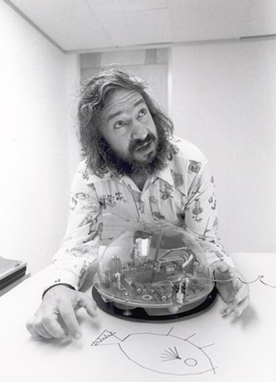
Figure 14.1: 海龜繪圖發明人 Seymour Papert 與他的海龜(MIT Museum)
繪一個正方形:
Pen down
Forward 10
Right 90
Forward 10
Right 90
Forward 10
Right 90
Forward 10
Pen up
原本設計目的是教孩子寫程式。對程式設計師來說,它也是繪製複雜圖形的好工具——作者曾用 Commodore 64 的 Logo 海龜寫過一個精細的 Lunar Lander 遊戲。
目標:API 而非命令列#
作者要的不是命令列介面,而是Clojure API,可以直接從程式呼叫:
(defn polygon [theta len n]
  (pen-down)
  (speed 1000)
  (dotimes [_ n]
    (forward len)
    (right theta)))

(defn turtle-script []
  (polygon 144 400 5))
這支程式會畫出一顆五芒星。
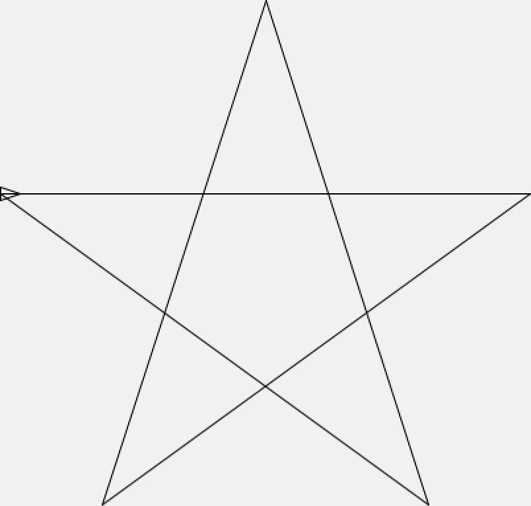
Figure 14.2: 用海龜繪圖畫出的星星(注意左頂點上的小海龜)
注意
polygon並非函式式——它沒有回傳值,純粹靠副作用畫圖。每個命令也都會修改海龜狀態。然而整個 turtle-graphics 框架本身是「函式式」的——大概是 GUI 程式所能達到的最函式式的形態。畢竟 GUI 的本質就是修改螢幕狀態。
進入 Quil#
(defn ^:export -main [& args]
  (q/defsketch turtle-graphics
               :title "Turtle Graphics"
               :size [1000 1000]
               :setup setup
               :update update-state
               :draw draw-state
               :features [:keep-on-top]
               :middleware [m/fun-mode])
  args)
關鍵欄位:
:setup:程式啟動時呼叫一次:draw:每秒呼叫 60 次更新畫面,畫面不記得任何東西——所有要顯示的內容都得每次重畫:update:在:draw之前呼叫,用來把當下狀態推進 1/60 秒
可以把這想成一個極簡的尾遞迴迴圈:
(loop [state (setup)]
  (draw-state state)
(recur (update-state state)))把它看成尾遞迴迴圈時,畫面內容就是「尾遞迴的值」。即使我們在修改畫面,修改也只發生在尾遞迴位置——是無害的(差不多無害)。
這雖然不是純函式式,已經是 TCO 系統能達到的最函式式形態。
setup 與狀態結構#
(defn setup []
  (q/frame-rate 60)
  (q/color-mode :rgb)
  (let [state {:turtle (turtle/make)
               :channel channel}]
    (async/go
      (turtle-script)
      (prn "Turtle script complete"))
    state))
關鍵:
- 設定 60 fps、RGB 色彩
state包含:turtle與:channelasync/go在輕量執行緒中跑turtle-script
Turtle 的型別 spec#
(s/def ::position (s/tuple number? number?))
(s/def ::heading  (s/and number? #(<= 0 % 360)))
(s/def ::velocity number?)
(s/def ::distance number?)
(s/def ::omega    number?)
(s/def ::angle    number?)
(s/def ::weight   (s/and pos? number?))
(s/def ::state    #{:idle :busy})
(s/def ::pen      #{:up :down})
(s/def ::pen-start (s/or :nil nil?
                         :pos (s/tuple number? number?)))

(s/def ::line-start (s/tuple number? number?))
(s/def ::line-end   (s/tuple number? number?))
(s/def ::line  (s/keys :req-un [::line-start ::line-end ::line-weight]))
(s/def ::lines (s/coll-of ::line))
(s/def ::visible boolean?)
(s/def ::speed   (s/and int? pos?))

(s/def ::turtle
  (s/keys :req-un [::position ::heading ::velocity ::distance
                   ::omega ::angle ::pen ::weight ::speed
                   ::lines ::visible ::state]
          :opt-un [::pen-start]))

(defn make []
  {:post [(s/assert ::turtle %)]}
  {:position [0.0 0.0]
   :heading  0.0
   :velocity 0.0
   :distance 0.0
   :omega    0.0
   :angle    0.0
   :pen      :up
   :weight   1
   :speed    5
   :visible  true
   :lines    []
   :state    :idle})
make用:post條件 assert 自己回傳的 turtle 符合 spec——這在更新「大型結構」時非常有用,能確保你沒不小心弄壞某個小角落。
draw-state:把當前狀態畫出來#
(defn draw-state [state]
  (q/background 240)
  (q/with-translation
    [500 500]
    (let [{:keys [turtle]} state]
(turtle/draw turtle))))(defn draw [turtle]
(when (= :down (:pen turtle))
(q/stroke 0)
(q/stroke-weight (:weight turtle))
(q/line (:pen-start turtle) (:position turtle)))
(doseq [line (:lines turtle)]
(q/stroke-weight (:line-weight line))
(q/line (:line-start line) (:line-end line)))
(when (:visible turtle)
(q/stroke-weight 1)
(let [[x y] (:position turtle)
heading (q/radians (:heading turtle))]
(q/with-translation [x y]
(q/with-rotation [heading]
;; 畫海龜三角形
...)))))每次 60 fps 重畫:
- 背景塗淺灰
- 畫面中心對齊 (500, 500)
- 畫進行中的線、所有歷史線、海龜本體
update-state:推進狀態#
(defn update-state [{:keys [channel] :as state}]
  (let [turtle (:turtle state)
        turtle (turtle/update-turtle turtle)]
(assoc state :turtle (handle-commands channel turtle))))(defn update-turtle [turtle]
{:post [(s/assert ::turtle %)]}
(if (= :idle (:state turtle))
turtle
(let [{:keys [distance state angle lines position pen pen-start]
:as turtle}
(-> turtle
(update-position)
(update-heading))
done? (and (zero? distance) (zero? angle))
state (if done? :idle state)
lines (if (and done? (= pen :down))
(conj lines (make-line turtle))
lines)
pen-start (if (and done? (= pen :down))
position
pen-start)]
(assoc turtle
:state state
:lines lines
:pen-start pen-start))))行為:
- 海龜在
:idle時什麼都不做 - 否則更新
position(按速度)與heading(按角速度) - 動作走完後切回
:idle、把當下這條線收進歷史
handle-commands:從 channel 讀指令#
(defn handle-commands [channel turtle]
  (loop [turtle turtle]
    (let [command (if (= :idle (:state turtle))
                    (async/poll! channel)
                    nil)]
      (if (nil? command)
        turtle
        (recur (turtle/handle-command turtle command))))))
只有在 :idle 時才取下一個指令。每個指令都被翻成對 turtle 的更新:
(defn forward [turtle [distance]]
  (assoc turtle :velocity (:speed turtle)
                :distance distance
                :state    :busy))

(defn right [turtle [angle]]
  (assoc turtle :omega (* 2 (:speed turtle))
                :angle angle
                :state :busy))

(defn handle-command [turtle [cmd & args]]
  (condp = cmd
    :forward  (forward turtle args)
    :back     (back turtle args)
    :right    (right turtle args)
    :left     (left turtle args)
    :pen-down (pen-down turtle)
    :pen-up   (pen-up turtle)
    :hide     (hide turtle)
    :show     (show turtle)
    :weight   (weight turtle args)
    :speed    (speed turtle args)
    :else     turtle))
turtle-script 把指令送進 channel#
(def channel (async/chan))
(defn forward  [distance] (async/>!! channel [:forward distance]))
(defn back     [distance] (async/>!! channel [:back distance]))
(defn right    [angle]    (async/>!! channel [:right angle]))
(defn left     [angle]    (async/>!! channel [:left angle]))
(defn pen-up   []         (async/>!! channel [:pen-up]))
(defn pen-down []         (async/>!! channel [:pen-down]))
(defn hide     []         (async/>!! channel [:hide]))
(defn show     []         (async/>!! channel [:show]))
(defn weight   [weight]   (async/>!! channel [:weight weight]))
(defn speed    [speed]    (async/>!! channel [:speed speed]))
async/>!!把值送進 channel;channel 滿了就阻塞等待。至此整個系統運作起來:使用者在
turtle-script中寫的命令會被推進 channel,由 update loop 拉出來改變 turtle 狀態,再由 draw loop 重新畫出來。
結語#
這是「函式式風格與 GUI 共存」的一個實際樣本:所有狀態改變都集中在 update loop 的尾遞迴位置;GUI 框架(Quil)不需要被改造,純函式式邏輯與必要的副作用乾淨地分離。
這種「函式式核心 + 狀態邊界」的模式,是與 GUI 共存的標準解。